1
12. ADVANCED FUNCTIONS
12.9 Setup
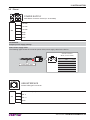
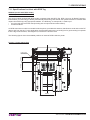
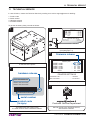
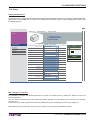
Embedded Web Server
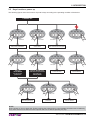
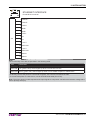
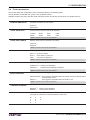
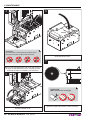
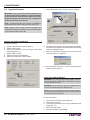
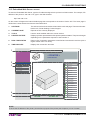
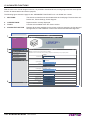
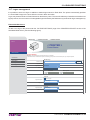
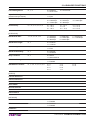
Printer permits the configuration of default parameters for printer and network setup by entering the “PRINTER SETUP”
page and the “NETWORK SETUP” page of the “PRINTER SETTINGS” section of the embedded Web Server (see
the following figure).
DEVICE INFO
│
PRINTER SETTINGS
│
PRINTER SUPPORT
Web Site
< PRINTER >
R>
TE
RIN
<P
Ticket Printer
PRINTER SETTINGS
< PRINTER > Printer Settings
Printer Emulation
Printer Setup
Network Setup
Email Setup
Email Log
Autofeed
Chars/inch
Busy Condition
Print Mode
Print Density
Speed/Quality
Paper Width
Paper Threshold
Notch Position
ESC/POS (TM)
CR disabled
?
May, 2010
Today
<<
<
wk
Sun Mon Tue Wed Thu Fri Sat
>
16
A=15 B=20 cpi
RxFull
Normal
>>
1
17
2
3
4
5
6
7
8
18
9
10
11
12
13
14
15
19
16
17
18
19
20
21
22
20
23
24
25
26
27
28
29
21
30
31
Time:
12 : 00
0%
Select date
Apply Date and Time
High Speed
82 mm
40 %
Disabled
Notch Threshold
40 %
Notch Distance
+0.0
Ticket Locking
Disabled
Paper End Buffer Clear
Disabled
COM Port Settings
RS232 Baud Rate
RS202 Data Lenght
115200 bps
8 bits/chr
Mass Storage / FTP Server
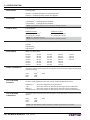
It is possible to configure the default parameters for printer and network setup by editing the “Setup.ini” file on the
printer Flash Drive.
You can enter the Flash Drive by files sharing from Mass Storage or by files sharing from FTP Server connection
(see par.12.1).
In both cases, the relative parameter should be enabled during the configuration process (see chapter 5).
After editing printer’s parameter, simply save the “Setup.ini” file to make the modifies activated.
User manual
KPM302-KPM303 143