1
BASIC OPERATION
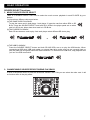
SOURCE SELECT functions
1. MUSIC SOURCE DEVICE SELECT
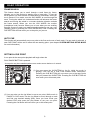
There is a SOURCE SELECT BUTTON to select the music source playback in each PLAYER by your
desires.
You have three different choices as below:
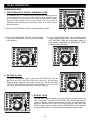
(a) THE SAME CARD PLAYBACK
To play the same card in both player 1 and player 2; insert the card into either SDA or SD
B slot. Press the SOURCE SELECT and both SD A LEDs in the player panel are on when
card is in SD A slot; either does when card is in SD B slot.
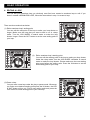
(b)TWO CARDS PLAYBACK
Each SD slot inserts a card to play. And each player select different SD slot to play.
or
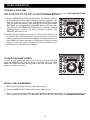
(c) THE USB PLAYBACK
Press the SOURCE SELECT button and both SD A/B LEDs are on to play the USB device. When
connecting a USB stick, USB card reader, or external hard drive make sure you are correctly lined up
with the USB port and gently insert the USB connection. To disconnect a USB drive, stop playback and
"pull out" the USB connection.
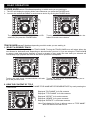
2. CHANGE MUSIC SOURCE DEVICE DURING PLAYBACK
It must in the pause mode, to press the SOURCE SELECT BUTTON you can select the other card. It will
no function when in the play mode.
7