1
TABLE OF CONTENTS
1
INTRODUCTION
5
1.1
1.2
The CCV Budget payment terminal
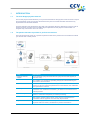
The parties that make it possible to perform transactions
5
5
2
INSTALLATION OF THE PAYMENT TERMINAL
6
2.1
2.2
Components supplied
Installation requirements
2.2.1
Installation of the payment terminal
2.2.2
Use of the card reader
2.2.3
Environmental factors
Connecting the equipment
Setting up communication
2.4.1
Getting an Internet subscription
2.4.2
Setting a static IP address
2.4.3
Setting a dynamic IP address
2.4.4
Testing the communication links
6
7
7
7
7
8
9
10
10
12
13
3
WORKING WITH THE PAYMENT TERMINAL
15
3.1
3.2
3.6
3.7
Overview of the payment terminal
Operating the payment terminal
3.2.1
Entering letters
The menu of the payment terminal
3.3.1
Symbols for menu options
Merchant password
Start-up and shutdown of the payment terminal
3.5.1
Performing an activation of the terminal
3.5.2
Performing a deactivation of the terminal
The use of payment cards
Placing a printing paper roll
15
16
17
18
18
19
20
20
20
21
21
4
PERFORMING TRANSACTIONS
22
4.1
4.4
4.5
4.6
4.7
Overview of the different types of transactions
4.1.1
Which transactions can I perform with a payment card?
Entering a tip during a transaction
Sale
4.3.1
Perform a manual credit card transaction
Cancellation
Reservation
Sale after reservation
Refund
22
22
24
25
26
27
29
30
31
5
PAYMENT CARDS
32
5.1
5.2
View settings for payment cards
Change settings for payment cards
5.2.1
Adding a payment card
5.2.2
Removing a payment card
5.2.3
Changing the registration number of a payment card
Check whether the changes for the payment cards were
implemented successfully
32
34
34
36
37
6
FINANCIAL REPORTS
40
6.1
6.2
6.3
The different types of reports
Automatically printing reports at a deactivation of the terminal
Interim printing of reports
6.3.1
Total report
6.3.2
E-journal
40
40
40
40
42
2.3
2.4
3.3
3.4
3.5
4.2
4.3
5.3
CID110A/08062013
39
3 / 56