1
CMSImport PRO User manual
Version 2.4
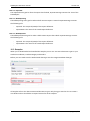
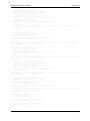
INSERT [umbracoAppTree] ([treeSilent], [treeInitialize], [treeSortOrder], [appAlias],
[treeAlias], [treeTitle], [treeIconClosed], [treeIconOpen], [treeHandlerAssembly],
[treeHandlerType], [action]) VALUES (0, 0, 16, N'developer', N'CMSImportSettings',
N'Settings', N'folder.gif', N'folder_o.gif', N'CMSImportLibrary',
N'ApplicationTree.ImportSettingsTree', N'')
INSERT [umbracoAppTree] ([treeSilent], [treeInitialize], [treeSortOrder], [appAlias],
[treeAlias], [treeTitle], [treeIconClosed], [treeIconOpen], [treeHandlerAssembly],
[treeHandlerType], [action]) VALUES (0, 1, 10, N'developer', N'CMSImportWizard', N'CMSImport',
N'folder.gif', N'folder_o.gif', N'CMSImportLibrary', N'ApplicationTree.CMSImportTree', N'')
INSERT [umbracoAppTree] ([treeSilent], [treeInitialize], [treeSortOrder], [appAlias],
[treeAlias], [treeTitle], [treeIconClosed], [treeIconOpen], [treeHandlerAssembly],
[treeHandlerType], [action]) VALUES (0, 0, 11, N'developer', N'CMSImportWizardSaveImportTree',
N'Saved Imports', N'folder.gif', N'folder_o.gif', N'CMSImportLibrary',
N'ApplicationTree.SavedImportTree', N'')
INSERT [umbracoAppTree] ([treeSilent], [treeInitialize], [treeSortOrder], [appAlias],
[treeAlias], [treeTitle], [treeIconClosed], [treeIconOpen], [treeHandlerAssembly],
[treeHandlerType], [action]) VALUES (0, 0, 15, N'developer',
N'CMSImportWizardScheduleImportTree', N'Scheduled Imports', N'folder.gif', N'folder_o.gif',
N'CMSImportLibrary', N'ApplicationTree.ScheduledTaskTree', N'')
11.3 Manual configuration of the language files
When the install failed due insufficient rights of the installer. It’s better to assign sufficient rights to
the /umbraco/config/lang/ folder (and all the xml files in that folder). Then start CMSImport PRO
again. CMSImport Pro will determine that the language file is not updated and will automatically
update the language files again.
If for some reason this isn’t the case you can modify the files manually. To do this open the
necessary language files. For example if you use the English language in Umbraco open en.xml, if
you use the Dutch language in Umbraco open nl.xml etc.
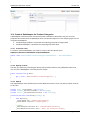
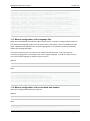
Replace
<area alias="actions">
With
<area alias="actions">
<key
<key
<key
<key
<key
<key
alias="DeleteCMSImportAction">Delete</key>
alias="ExecuteCMSImportWizardAction">Execute</key>
alias="ScheduleCMSImportWizardAction">Schedule</key>
alias="StartCMSImportWizardAction">Import Data</key>
alias="StartCMSImportChildDefinitionAction">Create child definition</key>
alias="LastRunInfoAction">Scheduled task log</key>
11.4 Manual configuration of the scheduled task handler
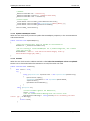
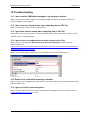
Open the /config/umbracoSettings.config file.
Replace
</scheduledTasks>
With
<task log="true" alias="CMSImportScheduler" interval="60" url="[url to
mysite/umbraco/]/plugins/CMSImport/Handlers/ScheduleTaskHandler.ashx" />
</scheduledTasks>
© 2013 Soeteman Software
page 48 / 50