1
S1000 System User Guide
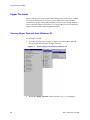
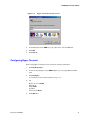
Figure 6-2
Hyper Terminal Start Up Screen
3.
In the Name field, enter COM_1 (or any other name, such as S1000 CLI).
4.
Click OK.
5.
Click Cancel.
Configuring Hyper Terminal
Before using Hyper Terminal you must set the PC serial port parameters:
1.
Click File/Properties.
2.
In the Connect Using box, select COM1 (unless you are using a different COM
port)
3.
Click Configure.
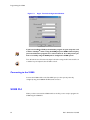
You should now see the same window as in Figure 6-3.
4.
Set:
Bits per second: 115200
Data bits: 8
Parity: None
Stop bit: 1
Flow Control: None
5.
Document 900.0036
Click OK twice.
31