1
II. Installation procedures
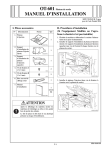
4. Fix the authentication unit on the working table
using velcro fastenings (A and B) furnished with
the unit.
A: three places on the back of the authentication
unit
B: three places on the working table
1. Turn off the machine and unplug the power cord
from the power outlet.
2. Attach the ferrite core as shown in the illustration.
Note:
• Install the ferrite core by winding the cable two
turns.
• Place the ferrite core approximately 60 mm
away from the authentication unit.
A09NIXC004DB
5. Attach the cord clamp onto the position shown in
the illustration.
Note:
The cord clamp is furnished with the working table
(WT-502).
A09NIXC009DA
A09NIXC010DA
3. Remove the cap from the working table (one
place).
A09MIXC008DA
6. Run the authentication unit cable through the
hole in the working table.
7. Route the cable as shown in the illustration so
that the wire saddles (three places) and the cable
clip (one place) hold the cable securely.
A09MIXC003DA
A09NIXC006DA
E-2