1
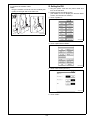
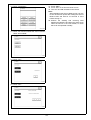
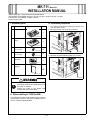
7. Touch “System 1.”
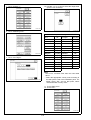
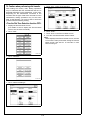
10. Use the
or
key to select the Target Area
(Refer to the list below).
A00JIXE118DA
A00JIXE121DA
8. Touch “Marketing Area.”
Country code setting for FAX
U.S.
US
Portugal
EU* (PT)
Canada
CA
Italy
EU* (IT)
Germany
DE
Poland
EU* (PL)
U.K.
EU* (GB) Taiwan
TW
France
EU* (FR) Australia
AU
Switzerland EU* (CH) New Zealand
NZ
Netherlands EU* (NL) Hong Kong
HK
Belgium
EU* (BE) Thailand
US
Austria
EU* (AT) Malaysia
MY
Norway
EU* (NO) Singapore
SG
Sweden
EU* (SE) South Africa
ZA
Finland
EU* (FI)
China
CN
Ireland
EU* (IE)
Korea
KR
Denmark
EU* (DK) Argentina
Spain
EU* (ES)
A02EIXE063DA
9. Touch “Fax Target.”
AR
Note:
Set OT for countries other than the ones listed
above.
* Select the appropriate country code according to
the dial system used in the installation place. For
DTMF, select “EU,” and for dial pulse, select
“each destination country code.”
A00JIXE120DA
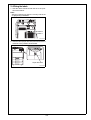
11. Touch “END” twice.
12. Touch “FAX.”
A00JIXE118DA
E-6