1
Upgrading from Oracle9i Database and Oracle Database 10g Release 1
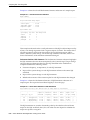
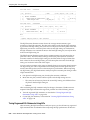
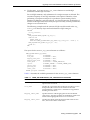
Table 7–1 (Cont.) DBMS_SQLTUNE.SELECT_SQL_TRACE Function Parameters
Parameter
Description
select_mode
Specifies the mode for selecting SQL statements from the trace
files. The default value is SINGLE_EXECUTION. In this mode,
only statistics for a single execution per SQL statement will be
loaded into the SQL tuning set. The statistics are not cumulative,
as is the case with other SQL tuning set data source table
functions.
options
Specifies the options for the operation. The default value is
LIMITED_COMMAND_TYPE, only SQL types that are meaningful
to SQL Performance Analyzer (such as SELECT, INSERT,
UPDATE, and DELETE) are returned from the SQL trace files.
pattern_start
Specifies the opening delimiting pattern of the trace file sections
to consider. This parameter is currently not used.
pattern_end
Specifies the closing delimiting pattern of the trace file sections
to process. This parameter is currently not used.
result_limit
Specifies the top SQL from the (filtered) source. The default
value is 231, which represents unlimited.
See Also:
■
Oracle Database PL/SQL Packages and Types Reference for
information about the DBMS_SQLTUNE package
Testing Database Upgrades from Oracle9i Database and Oracle Database 10g Release 1
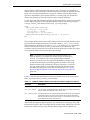
Once the SQL tuning set is built, you can use SQL Performance Analyzer to build a
pre-upgrade SQL trial from the execution plans and run-time statistics in the SQL
tuning set. After the pre-upgrade SQL trial is built, you need to perform a test execute
or generate plans of SQL statements in the SQL tuning set on the test system to build a
post-upgrade SQL trial. SQL Performance Analyzer test executes the SQL statements
using a public database link that you specify by connecting to the test system remotely
and generating the execution plans and statistics for the SQL trial. The database link
should exist on the SQL Performance Analyzer system and connect to a remote user
with privileges to execute the SQL tuning set on the test system.
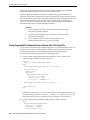
You can run SQL Performance Analyzer to test a database upgrade from Oracle9i
Database or Oracle Database 10g Release 1 using Oracle Enterprise Manager or APIs,
as described in the following sections:
■
■
Testing Database Upgrades from Oracle9i Database and Oracle Database 10g
Release 1 Using Enterprise Manager
Testing Database Upgrades from Oracle9i Database and Oracle Database 10g
Release 1 Using APIs
Testing Database Upgrades from Oracle9i Database and Oracle Database 10g
Release 1 Using Enterprise Manager
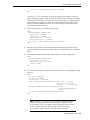
To test a database upgrade from Oracle9i Database or Oracle Database 10g Release 1
using SQL Performance Analyzer:
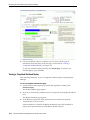
1.
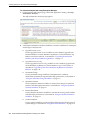
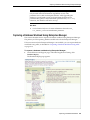
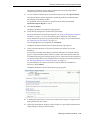
On the Software and Support page, under Real Application Testing, click SQL
Performance Analyzer.
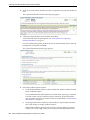
The SQL Performance Analyzer page appears.
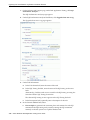
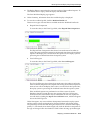
2.
Under SQL Performance Analyzer Workflows, click Upgrade from 9i or 10.1.
7-6 Oracle Database Real Application Testing User's Guide