1
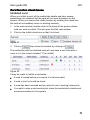
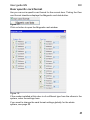
User guide EN
RX
CONTENTS
THIS USER GUIDE ______________________________________________ 1
INTRODUCTION ________________________________________________ 1
TERMINOLOGY _________________________________________________ 2
CREATE CONTACT WITH THE HARDWARE _______________________ 4
STARTING THE RX PROGRAMFEL! BOKMÄRKET ÄR INTE DEFINIERAT.
The Login screen____________________________________________________ 5
The Main window ____________________________________________________ 7
Menus and buttons _________________________________________________________8
CALENDAR AND TIME SCHEDULES______________________________ 9
Calendar __________________________________________________________ 10
Day types________________________________________________________________ 11
Defining day types________________________________________________________ 12
Creating a calendar ________________________________________________ 13
Changing the calendar ____________________________________________________ 14
Time schedules ____________________________________________________ 16
Defining time schedules___________________________________________________ 16
Creating and changing a time schedule_____________________________________ 17
TIME SCHEDULED DOOR FUNCTIONS __________________________ 20
Card + PIN _______________________________________________________________ 20
Unlocked ________________________________________________________________ 20
Door code _______________________________________________________________ 20
Exit button _______________________________________________________________ 20
Configuring the time scheduled door functions _______________________ 21
UG5589162921A.doc
Contents 1
RX
User guide EN
CARDS AND CARDHOLDERS ___________________________________ 25
Card ______________________________________________________________ 25
Creating a new card and cardholder _________________________________ 27
Linking the cards to doors and time schedules ________________________ 29
Creating a template card ___________________________________________ 32
Editing a card ______________________________________________________ 33
Deleting a card ____________________________________________________ 34
Card function check boxes __________________________________________ 35
Inhibited card ____________________________________________________________ 35
Alarm card ______________________________________________________________ 36
Caretaker function 1A ____________________________________________________ 38
External card ____________________________________________________________ 40
Disabled person’s card ___________________________________________________ 41
Unlock from reader 2A ____________________________________________________ 41
Disconnect unlock schedule 3A ____________________________________________ 43
REPORTS _____________________________________________________ 46
Choosing the events for your report ________________________________________ 46
Listing the events in your report on the screen ______________________________ 47
Printing your report ______________________________________________________ 47
Event categories ___________________________________________________ 48
MAKING A BACKUP OF THE DATABASE ________________________ 49
Creating the backup database _____________________________________________ 49
Restoring the database ___________________________________________________ 50
Contents 2
User guide EN
RX
PLANNING AND SETTING UP THE SYSTEM ______________________ 51
Check list _________________________________________________________ 51
Tables ____________________________________________________________ 52
Time schedule ___________________________________________________________ 52
Who has access to which doors ____________________________________________ 53
Door settings ____________________________________________________________ 54
System data _______________________________________________________ 55
Global setting of magnetic card data encoding ______________________________ 59
Advanced door function settings ____________________________________ 61
Door specific card format _________________________________________________ 69
Information for new cardholders_____________________________________ 72
Using function cards _____________________________________________________ 74
ALARM SETTINGS _____________________________________________ 78
Alarm relays window _______________________________________________ 78
Alarm zone window ________________________________________________ 80
USERS/OPERATORS ___________________________________________ 83
Changing the master operator name and password ___________________ 83
Adding a new user/operator _________________________________________ 84
CHANGE IP ADDRESS MANUALLY ______________________________ 85
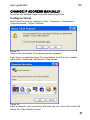
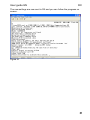
Configure Telnet _________________________________________________________ 85
Changing IP address with the computer directly connected __________________ 88
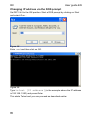
Changing IP address via the DOS prompt ___________________________________ 90
FIRMWARE UPDATE ___________________________________________ 91
RESETTING THE LOGIN INFORMATION _________________________ 92
YOUR NOTES __________________________________________________ 93
Contents 3
User guide EN
RX
THIS USER GUIDE
The purpose of this guide is to give a clear and easy explanation of how to
use the RX system.
We hope that you will find this manual easy to use even without previous
knowledge, except experience from working with Windows.
Text written in italics refers to text on the screen or on keyboard keys. Text
which should be entered by the user on the keyboard is written in
Courier typeface.
We have tried to avoid technical terms as much as possible, but sometimes
it is necessary to use words and phrases that have a specific meaning
within the system. There is a section explaining the terminology on page 2.
INTRODUCTION
The RX access control system is easy to operate because it uses your
regular internet browser to communicate with the hardware across a
standard TCP/IP network. No software installation is needed on the PC –
the software is contained in the control unit, along with all the system data.
The system can be supervised from any computer on the network.
RX can be used to control access at up to 16 doors. Each door can have
one or two card readers, an exit button and an automatick door opener.
The control unit validates the cards and either grants or denies access
through the doors, but it can also be used for other functions such as alarm
control.
1
RX
User guide EN
TERMINOLOGY
Alarm card
A card or tag which generates some sort of alarm
function or siwthes on/off other equipment when it is
read.
Browser
Software commonly used for connection to the Internet.
For example, Microsoft Internet Explorer (version 7 or
later) or Mozilla Firefox (version 3 or later).
Calendar
A calendar which is used by the system to control
events, depending on day of the week and/or day of the
year.
Card
This is the general term used in this guide for all coded
devices such as access cards and tags. A card is often
credit card size, but there are many other reader
technologies and they may be encased in a key ring tag
or similar.
Card number
The unique number encoded in the card which the
system validates and then grants or denies access.
Sometimes this is a combination of system number (see
below) and card number.
Database
The part of the RX system memory where changeable
data is stored, such as card details, time schedules and
the event log.
Default
The settings that the system has when it is delivered:
these settings can be restored by performing a master
reset.
Door Code
A four-digit code entered on the keypad to gain access
without having to use a valid card.
Duress code
When the cardholder enters a PIN code that is 1000
higher than the actual code it causes the system to
generate a duress alarm. For example, if the PIN code
is 1234, entering 2234 will still gain access through the
door but will generate a duress alarm. The duress PIN
for PIN code 9234 will be 0234.
When the duress alarm is generated, it means that the
cardholder is in some sort of trouble – the system can
operate a relay when the alarm is generated.
Don’t forget to inform all cardholders about the duress
function and how to use it.
2
User guide EN
RX
External cards
Cards that are encoded for use in other systems but
have been approved for use in the system.
Event log
The part of the RX system database in which all the
events that have occurred in the system are saved.
Inhibit
A software function which disables a card without
removing it from the database – the card will no longer
be able to gain access at any door.
Master reset
A function that clears the settings and data back to a
known state. After a master reset, the equipment has
the same settings it had when it was delivered.
PIN
Personal Identification Number. A secret number,
known only by the cardholder, used to increase the
security when used in addtion to card validation.
Reader
The equipment installed near the door which reads the
card and sends the card number to the control unit
where it is validated.
System number
An additional security code in the form of an extra sixdigit number saved in the system and encoded in in all
cards used by the system. This number is validated first
to make sure the card belongs to the system.
Validation
(Authority check)
The term used to describe the control process the
system performs to decide how to react after a card has
been read.
3
RX
User guide EN
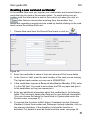
CREATE CONTACT WITH THE HARDWARE
The RX control unit must be connected to a network which allocates IP
addresses automatically (DHCP).
When the hardware is installed you have to
find it in the system. In the browser you
communicate with the control unit via its IP
address, the address all connected units in
the system will get automatically.
Run the RX finder software to search for the
IP address of your system .
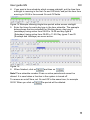
Figure 1
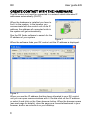
When the software finds your RX control unit the IP address is displayed.
Figure 2
When you see the IP address that has been allocated to your RX control
unit you can open communications with it. Double-click on the IP address
or select it and click on the Open browser button. When the browser opens
(see next page for details), save the page as a favourite/bookmark in your
browser, and/or as a shortcut on your desktop.
4
User guide EN
RX
START THE RX PROGRAM
Find the IP address to the RX control unit with the aid of RX finder and
open the browser according to the description on the previous page.
http: or https: login
The login can be as http: or https: Default is https: mode activated. See the
installation guide if you wish to change to http:
ASSA recommends that you use https: secure login.
At login you get a warning that the certificate is unsafe, the reason for that
is that the certificate is unknown for the browser. Click on continue/the link
Continue to this website (not recommended).
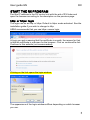
Clicking on the link opens the login window.
The appearance of the login windows differs depending on which browser
you use.
5
RX
User guide EN
The Login screen
When you enter the address in the browser a login window opens. It looks
different depending on which browser you use.
Figure 3 Login window for Internet Explorer 7
Figure 4 Login window for Mozilla Firefox
Figure 5 Login window for Apple Safari
As delivered, the default username is master and the password is blank
(null). You can change these settings later in the software.
Enter the username and password then click on the OK or Log In button.
The main window opens from where you can administer all the settings in
the system, see Figure 6.
There is no log out function in the system: you simply close the browser (all
open windows and tabs). There is no timeout after which the user is logged
out, so bear this in mind when leaving the computer unattended, even for
short periods. A solution to this may be to set up a password-protected
screen saver which is activated when you leave the computer idle for a little
while.
6
User guide EN
RX
The Main window
Figure 6
The main browser window has two tabs, Person/Card and Door.
On the Person/Card screen, all cardholders are listed along with their
authorities and the doors to which they have access. At the bottom of the
screen you can see all the different time schedules stored in the system.
These time schedules determine when cards are allowed through the
doors.
On the Door screen you configure the settings which determine how each
door should operate, for example when it should be locked or unlocked and
the various access conditions for different times of the day and days of the
week.
7
RX
User guide EN
Menus and buttons
Figure 7
The menus are shown at the top of the window. The buttons beneath the
menus are shortcuts which give access quickly to some of the menus and
submenus.
The following pages describe the different parts of the system to make it
easy for you to create your calendar, your day types and time schedules.
We also describe how you add cards and cardholders (see page 27) so
you can quickly get started with RX.
8
User guide EN
RX
CALENDAR AND TIME SCHEDULES
The main purpose of an access control system is to grant or deny access
(validation) through each door according to whether the cardholder is
authorised to gain entry at that door.
In addition, a cardholder may be authorised to gain entry at a door at
certain times of the day on certain days of the week, and be denied access
at other times.
It may, for example, be ok for an employee to have full access to all doors
during office hours, but not at 23.30 on a Saturday night.
The system uses a calendar and different time schedules to accomplish
this, and the installation can be tailor-made to the requirements of each
user.
In addition to card validation at doors, the calendar and time schedule is
used for control of different door functions, for example:
When a door should be unlocked
When a PIN code is required
When a valid door code can be used
When a door is blocked for all cards
When the buzzer is active
When the exit button is active
9
RX
User guide EN
Calendar
Most companies have different security levels depending on what day of
the week it is, and the time of day. There are also statutory holidays.
Take for example a haulage firm working between 9.00 and 17.00 five days
a week, and 9.00 to 12.00 on Saturdays. Some personnel may also need
access around the clock.
Compare this with a health centre which is open 15 hours a day, seven
days a week. These two organisations obviously have different
requirements when it comes to setting up the calendar.
The system uses “day types” to separate days with different access
conditions from each other.
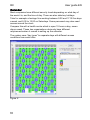
Figure 8
10
User guide EN
RX
Day types
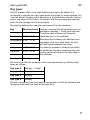
The RX system offers up to eight different day types. By default it is
configured to provide four day types which is enough for most systems, but
it can be altered to eight with a checkbox in System data under the System
menu, see page 56 for details. To explain how the day types are used we
shall use the haulage firm as an example.
We start by defining the calendar requirements for the company.
Day
Monday
Tuesday
Working hours Here we can see that the working hours on
weekdays (Monday – Friday) are identical.
9.00 – 17.00
Therefore each of these can have the
same day type in the calendar.
9.00 – 17.00
Wednesday 9.00 – 17.00
Thursday
9.00 – 17.00
Friday
9.00 – 17.00
Saturday
9.00 – 12.00
Sunday
Closed
Holiday
Closed
Saturdays and Sundays are different from
weekdays, and from each other, so they
will both need separate day types.
For security purposes, holidays can either
be treated as Sundays regarding day type,
or they can be given their own day type in
the calendar.
We now know that the company in this example needs four different day
types as follows:
Day type A
Monday – Friday
Day type B
Saturday
Day type C
Sunday
Day type D
Holiday
We will now define these day types in the system so that the software can
recognise them and use them at the right time.
11
RX
User guide EN
Defining day types
To define the day types you want to use, do as follows:
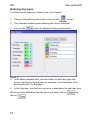
1. Choose Calendar from the menu or click on the
button.
2. The Calendar window opens showing the current calendar.
3. Click on the
button to display the Day types window.
Figure 9
4. In the Week template field, choose a letter for each day type that
occure regulary during the year, for example, A for weekdays, B for
Saturdays and C for Sundays.
5. In the Day type, text field you can enter a description for each day type.
When you have defined all the day types you need, click on
then on
12
.
and
User guide EN
RX
Creating a calendar
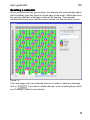
When you close the day type window, the calendar will automatically adjust
itself to display your day types for all the days of the week. Dates that are in
the past are hatched, and today’s date will be flashing. The calendar
automatically lines up so that the current month is in the left hand column.
Figure 10
If you are happy with your calendar and do not wish to make any changes,
click on
. If you want to make changes, such as adding days which
are “Holidays”, read the next section.
13
RX
User guide EN
Changing the calendar
When you have created a calendar which matches your company’s work
pattern, all that is left is to tell the system which days it should regard as
holidays, or any other irregular day type.
Figure 11
14
User guide EN
RX
You can enter a holiday on the calendar at any time before it occurs (in this
example we shall enter December 25). You do this as follows:
1. Choose Calendar from the menu or click on the
button.
2. In the body of the calendar, click on the day you want to define as a
holiday. The day will start flashing to show that it is selected, and the
selected date is also displayed in the Day/comment field on the right.
3. On the keyboard, press the day type letter you want to use for the
selected day. In this example we have used the letter D for the day
type representing a Holiday.
Figure 12
4. Click in the Day/comment field and type the details about this holiday
as shown below.
Figure 13
5. Repeat steps 2 to 4 for every day in the calendar whose day type you
need to change.
6. When you have made all your changes, click on
and then on
.
While the calendar is still displayed, clicking on the
button selects
today’s date in the calendar and causes it to start flashing.
To see the day types used during the previous year, drag the scrollbar at
the bottom of the window to the left. All days which are in the past are
displayed hatched like this:
.
15
RX
User guide EN
Time schedules
What is a time schedule?
A time schedule is a time table for the system. A time schedule links day
types with specific periods during the day, and the system uses this to
grant or deny access to cardholders depending on the day type and time of
day. A schedule can also be used to enable or disable other functions such
as a door being unlocked, or an alarm system being activated.
A simple example is the light in a stairwell that is lit for a few hours in the
morning, switched off during the day, and then lit again in the evening.
The RX system can store fifteen different time schedules, each of them can
contain one or two on/off periods for each day type, and there can be four
or eight day types depending on how you configure the system.
Defining time schedules
Even though it is easy to define time schedules in RX, having a good plan
in place first will make it even easier. Blank tables are provided in the
middle of this manual which you can use when you draw up your plan.
Continuing with the example we were using earlier we know that the work
hours for our fictitious company are 9.00 – 17.00 Monday to Friday, 9.00 –
12.00 Saturday, and closed on Sundays and holidays.
In addition to this, some members of staff will probably need access out of
working hours, and some may need access around the clock 24 hours a
day, 7 days a week.
This means that we need three time schedules for this company. We shall
call them Working hours, Extended time and Always on. Write the
required time schedules down in a table as shown below:
Day type Working hours Extended time Always on
Mon – Fri
A
9.00 – 16.59
7.30 – 18.59
00.00 – 23.59
Saturday
B
9.00 – 11.59
7.30 – 13.59
00.00 – 23.59
Sunday
C
Closed
Closed
00.00 – 23.59
Holiday
D
Closed
Closed
00.00 – 23.59
We now have enough information to create these time schedules in the
system.
16
User guide EN
RX
Creating and changing a time schedule
Up to fifteen user defined time schedules can be created in the system.
Each schedule is identified by a number (1 – 15) and this number is used to
link a specific time schedule to an access level or system function.
Each time schedule also has a name, and you should use this to describe
the time schedule and/or its function. Time schedules are displayed and
edited in the lower part of the main window:
Figure 14 Lower part of the main window
To create or alter a time schedule:
7. Click in the time schedule number field to open the drop-down menu,
then choose the desired time schedule number, either using the mouse
or by using the arrow keys and Enter on the keyboard. Or scroll
through your time schedules by clicking on
or
.
Note! Time schedule 1 is already defined as 24 hours a day, seven days a
week for all day types, and it is called 00:00 – 23:59. We recommend you
leave this time schedule as it is and use time schedule number 2 for the
first of your user defined ones.
17
RX
1. Click on the
User guide EN
button to display the whole time schedule.
Figure 15
2. Start by giving the time schedule a name. You can enter a more
thorough description of the time schedule and its function in the
Comment field.
Figure 16
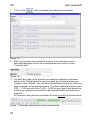
3. For each day type, enter the time you want the schedule to become
active in the On field and the time you want the schedule to become
inactive in the Off field. You can have two different periods for each day
type, as shown in the example below. This time schedule is active from
9.00 – 11.59 and also from 13.00 – 16.59 for day type A and should be
used for an entrance door that is to be unlocked when the reception is
manned.
All functions using the time schedule will work up until the entered time.
Figure 17 Example showing two active time periods
18
User guide EN
RX
4. If you want a time schedule which crosses midnight, put the time from
midnight to morning in the first On and Off fields, and put the time from
evening to 23:59 in the second On and Off fields.
Figure 18 Example showing single time period active across midnight
5. Enter the times for each day type in the time schedule. The example
below shows the time schedule for Working hours, day type A
(weekdays) being active from 09:00 to 16:59 and day type B
(Saturdays) being active from 09:00 to 11:59. Day types C and D
(Sundays and Holidays) are never active.
Figure 19
6. When finished, click on
and then on
.
Note! Time schedule number 0 has no active periods and cannot be
altered. It is used when a function in the system is turned off.
To remove an on/off time, set On and Off to the same time, for example
00:00. When you click on
the period will be deleted.
19
RX
User guide EN
TIME SCHEDULED DOOR FUNCTIONS
This section tells you how to configure the following door functions, all of
which are controlled by time schedules so that they are only active during
chosen times of the day and days of the week. You find the more advaced
door settings on page 60.
Card + PIN
When the Card + PIN function is active, access can only be gained if the
cardholder has a valid card and also enters a valid PIN. After using a valid
card, the cardholder will get an indication showing that a PIN must be
entered. (Requires a keypad.)
Unlocked
When the Unlocked function is active, the door will be unlocked during the
times defined in the time schedule. When the door is unlocked, this is
indicated by the green man.
Door code
When the Door Code function is active, access is granted if the correct
four-digit door code is entered on the keypad. The door can be unlocked
using either a valid card or by entering the correct door code. (Requires a
keypad.) Choosing the door code for a door is described on page 63.
Exit button
The door will unlock when the exit button is pressed. (Requires an exit
button or other similar device.)
Note! If none of the these door functions is active at any particular time
(apart from Exit button), the system defaults to normal Card only operation
– this means that access is granted whenever a valid card is read.
Some of the door function settings for your system will have already been
made at installation and commissioning. A lot of these settings are
determined by the hardware and the lock system you are using.
If the card readers in your system don’t have a keypad it isn’t possible to
use functions that require you to enter a code, for example a door code or
PIN code.
Some settings are determined by the requirements of working with ancillary
systems, such as an intruder alarm or a fire alarm.
If you are in doubt about the constraints of your installation, and you wish to
know how additional functions can be incorporated, please contact your
supplier.
20
User guide EN
RX
Configuring the time scheduled door functions
The time scheduled door functions are configured on the Door screen –
when you click on the Door tab you will see a screen similar to this one:
Figure 20 The main window with the Door tab selected
21
RX
If you click on
User guide EN
at the top right of the screen (see Figure 20) a
window opens where you can see an overview of the active times applied
to each door function.
Figure 21 Example with set up schedules
Looking at Day type A (Weekday) above, the exit button is enabled for the
whole 24 hours so someone inside the building can always get out. Outside
working hours entry can only be made with both a valid card and a valid
PIN code. At 9am the door is unlocked until midday, when a valid card is
required for access for 1 hour over lunchtime. From 1pm to 5pm the door is
unlocked again.
Notice that you do not actually configure an active time for when just a card
is required to gain entry – the system defaults to valid card only (second
line down in the tables above) if there is no active time period configured
for Unlocked, Door Code, or Card + PIN. In other words, if no selectable
door function is active you only have to use a valid card.
22
User guide EN
RX
You can set the time schedule for each door function as follows:
1. Choose the door from the drop-down menu, or scroll to the door with
the
and
buttons.
Figure 22
2. Choose the time schedule you want for each desired door function from
the drop-down menu. In this example, we’ll choose 00:00 – 23:59 for
the Exit button so that it is always enabled.
Figure 23
3. Repeat steps 2 for other door functions. For example, we’ll choose
Card + PIN to be active during the Night time and the door to be
Unlocked during Working hours:
Figure 24
Figure 25
23
RX
User guide EN
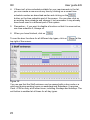
4. If there isn’t a time schedule suitable for your requirements in the list,
you can create a new one at any time by clicking on a vacant time
schedule number as described earlier and clicking on the
button on the time schedule part of the screen. You can also click on
an existing time schedule and change it, but remember it may already
have been used in a different part of the system.
5. Remember – if you want to disable a function so that it is never active,
use time schedule 0, Always off.
6. When you have finished, click on
.
To see the door functions for all different day types, click on
at the
top right of the screen.
Figure 26
You can see that the Staff entrance can be opened with a door code or a
valid card during working hours on weekdays and Saturdays. It requires
Card + PIN for entry at all other times, including Sundays and holidays. The
exit button is enabled at all times for all day types.
24
User guide EN
RX
CARDS AND CARDHOLDERS
The heart of an access control system is its cards and the people who use
them. It is thourogh and effective work with this that is the fundation of the
security in the system.
Each person who uses the system, the cardholder, is given a card with its
own unique card number. The cardholder may also be given a personal
code to use at times when a PIN must be entered to gain access. The card
is then linked to one or more time schedules which determine the doors
through which the cardholder may gain access, and the times/days when
access is permitted.
Figure 27
Card
A condition for an access system is some kind of code carrier, card or tag,
which gives access to the various doors connected to the system. RX can
handle special functions for selected cards which increases the flexibility
and simplifyes the card handling. The following section will show you how
to create new cards and cardholders, how to change existing ones, and
how to choose which doors they can unlock, along with other functions
which can be linked with cards. Note that when entering card numbers in
the system you can leave out the leading zeros.
25
RX
User guide EN
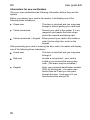
Information for new cardholders
Give your new cardholders the following information before they use the
system.
Before you present your card to the reader, it will display one of the
following three indications:
Green man
The door is unlocked and you may pass
through it without getting your card read.
Yellow arrow/card
Present your card to the reader. If it is a
magnetic card reader the black stripe
should be inwards and facing right.
Yellow arrow/card + Keypad Either present your card to the reader or
enter the four-digit door code on the
keypad.
After presenting your card or entering the door code, the reader will display
one of the following three indications:
26
Green man
The door is unlocked and you may pass
through it.
Red man
Access is not granted – your card is
invalid or you entered the wrong door
code. (The alarm may be activated.)
Keypad
Enter your personal identification number
(PIN) on the keypad – the green man
should then be lit and you can pass
through the door. If red man is lit you
have entered the wrong PIN.
User guide EN
RX
Creating a new card and cardholder
In the window New card you register your cardholders and connect them to
cards that can be used in the access system. To avoid writing over an
existing card the information is sent to the control unit when you click on
, after that you cannot alter anything from this window. Any
alterations regarding a saved card are made by double-clicking on the card,
which opens the window Edit card.
1. Choose New card from the Person/Card menu or click on
.
Figure 28
2. Enter the cardholder’s name in the Last name and First name fields.
3. In the Card no. field, enter the card number of the card you are issuing.
The highest card number you can use is 4294967294.
4. If this cardholder requires a Personal Identification Number (PIN), enter
it in the PIN field. You need to write down the PIN on paper and give it
to the cardholder so they can memorise it.
5. Enter any additional information about this cardholder in the following
fields. The five empty fields after Dept are for user defined information.
(You can choose the labels for these fields in System data under the
System menu, see page 57.)
6. To activate the functions Inhibit, Alarm, Caretaker function, External,
Disabled, Unlock from reader and Disconnect unlock schedule, click on
the relevant checkbox. If the checkbox is ticked the function is
activated. For details of what all these functions mean, see page 35.
27
RX
User guide EN
7. By default, new cards are set to have Unlimited validity. If you clear the
Unlimited validity checkbox you can enter a date and time at which the
card becomes valid, and another at which the card becomes invalid.
Figure 29
This facilitates if you create cards in advance. On the other hand it also
limits the validity forward in time, but you can alter this later. This
enables you to issue a card which will only work for a specific period of
time – for example a single day.
Figure 30
Choose a From date by clicking on the
icon which opens the
calendar shown in Figure 30. Choose the month and year with the
drop-down menus or by scrolling forwards or backwards with the
arrows, then click on the date you want on the calendar. The current
date is shown with red. Repeat this process for the To date. You can
also set specific times with the drop-down menus below the date.
8. Check that everything is entered correctly. If you want to continue
adding more cards, click on the
button. This saves the card,
clears the window and enters the next consecutive card.
9. When you have finished, click on
followed by
.
10. If you want to add a number of cards with the same authority, it is
easiest to create a Template card. See more about this on page 32.
28
User guide EN
RX
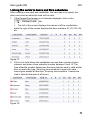
Linking the cards to doors and time schedules
After creating a new card and cardholder, the next step is to specify the
doors and times at which the card will be valid.
1. If the Person/Card screen is not already displayed, click on the
tab.
1. The left of the screen displays the names of all the cardholders,
while the right of the screen displays the door numbers D1, D2, D3, D4
etc.
Figure 31
2. Click in the field where the cardholder row and door number column
intersect and enter a time schedule number between 0 and 15. The
time schedule number determines the times that the card is valid at that
door on each day type. (Entering time schedule 0 means the card
cannot gain access at that door. Entering time schedule 1 means the
card is valid at that door at all times.)
Figure 32
29
RX
User guide EN
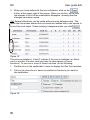
3. When you have defined all the time schedules, click on the
button at the upper right of the screen. When you do this, all the little
red squares in front of the cardholders disappear, showing that the
changes have been saved.
Tip! Several alterations can be made without saving between each. The
cards that have been altered but not saved are marked with a red square in
front of the Last name. These markings disappear when you click
.
Figure 33
The columns labelled I, A and F indicate if the card is Inhibited, an Alarm
card, or another Function card (see later for descriptions of these
functions). To set one or more of these functions, do the following:
1. Double-click on the cardholder’s name to display the Edit Card window.
2. Click in the check box or boxes to enable the functions you want for
this cardholder.
Figure 34
30
User guide EN
3. Click on the
RX
button, then close the window by clicking on the
button.
Figure 35
The green circle with a tick shows that this is an Alarm card and the blue
circle with the letter ”i” shows that there is one or several other functions
connected to the card. The red circle with cross shows that the card is
disabled (inhibited).
31
RX
User guide EN
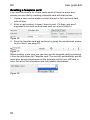
Creating a template card
If you want to create a lot of new cards which all have the same door
access you can start by creating a template card with that access.
1. Create a new card as earlier but start the text in the Last name field
with a # sign.
2. Enter a card number, it doesn’t have to exist. If it does, and aren’t
supposed to be used as an access card, you should inhibit it.
Figure 36
3. Save the template card and continue by giving the card desired access
to your doors, see page 29.
Figure 37
When creating a new card you can now use the template card by selecting
it from the drop-down list Template card. The card will automatically get the
same door access permissions as the template card but you still have to
enter the rest of the information and tick possible checkboxes.
Figure 38
32
User guide EN
RX
Editing a card
To change any information connected to a card, as name, department or
PIN code, or to enable/disable the functions:
1. Display the Edit Card window by double-clicking on the cardholder’s
name or card number in the main window. (You can also open the
window by selecting a door on the same row and then clicking on the
button to the right.)
Figure 39
2. Make any text changes by writing them in the proper field.
3. To activate/deactivate the Inhibit, Alarm, Caretaker function, External,
Disabled, Unlock from reader or Disconnect unlock schedule, click on
the checkbox. If the checkbox is ticked the function is activated.
4. To change the cardholder’s PIN, delete the dots in the PIN field and
then enter the new PIN. Note! The PIN code is shown as dots for
security reasons to make sure that only the cardholder knows the code.
5. You can change the validity from a limited to an unlimited, and vice
versa.
6. All changes can be ignored, click on
instead of
7. When you have made all your changes click on
.
and
.
33
RX
User guide EN
Deleting a card
1. Display the Edit Card window by double-clicking on the cardholder’s
name or card number in the main window. (You can also open the
window by selecting a door on the same row and then clicking on the
button to the right.)
Figure 40
2. Click on the
button.
3. Confirm that you want to delete the card by clicking on OK.
4. The card is now deleted from the system and the window closes.
34
User guide EN
RX
Card function check boxes
Inhibited card
When you inhibit a card, all the cardholder details and door access
permissions are retained, but the card will not work anywhere on the
system. When you remove the inhibit function by clearing the check box,
the card will immediately return to working normally.
1. In the main window, double-click on the name of the person whose
card you want to inhibit. This will open the Edit card window.
2. Click on the Inhibit check box so that it is ticked.
Figure 41
3. Click on
, then close the window by clicking on
.
The cardholder with the inhibited card will now have a red circle with a
cross in it in the column headed ”I” (for Inhibit).
Figure 42
It may be useful to Inhibit a card when:
A card is issued before you require it to become valid.
A card is lost, but could be found.
A card has been misused and you want to stop it working temporarily.
You want to stop a card working but retain the cardholder’s details and
access permissions in the system.
35
RX
User guide EN
Alarm card
A card which is configured as an alarm card, as well as giving access
through doors, can turn on or off other functions and equipment. For
example, you could use it for the following:
To turn off or on the intruder alarm when entering or leaving the
building. (When the intruder alarm is on, the reader is blocked for all
cards except alarm cards and then to turn the alarm off.)
To turn the intruder alarm on or off in part of the building when entering
or leaving. (An activated intruder alarm blocks the readers for the
rooms in question, so only alarm cards can be used to turn the intruder
alarm off.)
To turn ancillary equipment or systems on or off from the card reader.
To configure a card as an alarm card, click on the Alarm check box so that
it is ticked when creating or editing a card.
Figure 43
In the main window, alarm cards are displayed with a green circle with a
tick in the column headed A (for Alarm).
Figure 44
Contact your supplier to discuss your system configuration and how the
Alarm card function can be used.
The procedure for using an alarm card for switching the alarm system on or
off is described on the next page.
36
User guide EN
RX
Using an alarm card to switch the alarm on or off at a reader
A reader which is used to control an alarm has a symbol in the form of a
“square”. This shows the alarm status and if the symbol lits up red when
using the card the alarm is active. You are then denied access by the
reader. (The reader can have the setting to always show the alarm status.)
Cards with the authority Alarm can be used to turn the alarm on/off by
performing an alarm manoeuvre.
When you arrive to the building/zone and want to turn off the alarm:
When presenting the card the status indication shows red.
Press A, present the alarm card and enter your PIN code.
A+card+PIN
The status indication changes to green.
The alarm is deactivated and you can gain access by presenting your card.
(The reader can be set to unlock the door when you turn the alarm off. It
can also be set to turn the alarm off when you use your alarm card for
access.)
When leaving the building/zone and want to turn the alarm on:
When presenting your card the status indication shows green.
Press B, present the alarm card and enter your PIN code.
B+card+PIN
The status indication changes to red.
Bear in mind: Your PIN code is personal and should not be kept together
with the card.
37
RX
User guide EN
Caretaker function 1A
With a caretaker function card you can set a temporary door code so that
people can gain access to a room for a short period simply by entering the
door code on the keypad. This is useful for example for a conference room,
where you don’t want to issue everyone with a card, and nor do you want
the door to be left unlocked, or for it to be wedged open which is what
would normally happen if free access is required. The function also
decreases thefts from locker rooms since the door can be kept locked and
only people who know the current code can gain access.
If the room is alarmed, the alarm is turned off when the caretaker card is
read.
The procedure for setting up and removing a temporary door code is
described on the next page.
To configure a card as a caretaker card, tick the Caretaker function check
box when creating or editing the card that should have the function.
Figure 45
In the main window, caretaker cards are displayed with a blue circle with an
i in the column headed F (for Function).
Figure 46
38
User guide EN
RX
Setting/clearing a temporary door code using a caretaker card
One door code per card can be activated, with a maximum of 50 codes at
the same time.
Choosing and activating the temporary door code
Press 1A, present the caretaker card and enter desired door code.
1A+card+door code
The door code applies until it is deactivated.
Example:
To activate the door code 5379, press 1A+card+5379
Deactivating the temporary door code
Press 1B and present the caretaker card.
1B+card
The door returns to the currently scheduled function.
Deactivating the temporary door code at a specified time
The temporary door code becomes inactive when the caretaker card itself
becomes invalid. You can use this feature to deactivate the temporary door
code at a time of your choosing.
All you have to do is create a time schedule for the caretaker card with two
periods making the card invalid for at least one minute, for example:
Period 1 = 00:00 – 23:56
Period 2 = 23:58 – 23:59
Using these timings, the caretaker card will become invalid for one minute
at 23:57 (the card is valid up until 23:56 and then becomes valid again at
23:58). Because the temporary door code becomes inactive when the
caretaker card becomes invalid, the temporary door code will be
deactivated at 23:57.
You can choose other times of course, so the temporary door code stops
working whenever you want it to. For example, if you want the temporary
door code to become inactive at seven in the evening, choose settings for
the caretaker card time schedule as follows:
Period 1 = 00:00 – 18:59
Period 2 = 19:01 – 23:59
39
RX
User guide EN
External card
In a system using magnetic card readers a system number is specified in
the System menu, only cards programmed with that system number are
then valid. If you want to give authority to cards from other systems, for
example bank cards, you can override the system number by configuring
the card as an External card.
To use this function, the card must be of the correct type and the encoding
must be compatible. When you choose the External card function, the
reader will only read and validate the card number, but note that using this
function will decrease the security of the system a great deal.
Before creating an external card in the RX database, you must find out its
card number. This will vary depending on the source of the card and how it
is encoded. Talk to your supplier if you want to use this function.
If you don’t know the card number, do as follows:
1. Click on the Events menu and choose Realtime events.
2. A window opens which will display information about events in the
system. Ask the cardholder to use the external card in a nearby reader.
The window will show information about the card, as it being invalid but
also the card number.
Figure 47
3. Use this card number to add the card to your system. See page 27 for
information about how to create a new card.
4. Set the card as an External card by clicking on the External check box
so that it is ticked. The system will now ignore the system number and
only validate the card number for this particular card.
Figure 48
40
User guide EN
RX
Disabled person’s card
A card entered as a disabled person’s card causes the doors to be
unlocked/opened three times longer than would a standard card, making it
easier for a disabled person to gain access through a door. A disabled
person’s card can also activate a relay in the DAC which can be used to
operate an automatick door opener.
Tick the checkbox Disabled when you create or edit the card in ordet to
obtain the function. See more about creating new cards on page 27.
Figure 49
Unlock from reader 2A
This function enables a cardholder to unlock a door for a chosen period of
time by entering a code, presenting their card , and then entering the
duration for which the door is to remain unlocked. (If no duration is entered
the door remains unlocked until the next scheduled time, at which it returns
to the door settings and time schedules applicable for that time of day.)
To use this feature, it must be enabled in the card record and an “Unlock
from reader” time schedule must be applied to the door. This time schedule
determines when the card is allowed to unlock the door.
To enable this feature in the card, click on the Unlock from reader 2A
checkbox so it is ticked.
Figure 50
The reader manoueuvre, to set the door unlocked, is described on the next
page.
Applying the “Unlock from reader” time schedule to the door is described
on page 71.
41
RX
User guide EN
How to set a door unlocked
The Unlock from reader 2A checkbox must be ticked in the card record,
and the current door must have a “Schedule for unlock from reader /
Disconnect schedule from reader” time schedule applied to it. If both of
these requirements are met, the door can be unlocked either until the time
schedule for that door re-locks it, or for a period of time of your choosing
which you enter into the keypad.
Unlocking the door without specifying a time
Press 2A, present the card and finish by pressing A.
2A+card+A
The green man is lit.
The door remains unlocked until the time schedule locks it again.
Unlocking the door for a specified time
You can enter the time as minutes or hours. For the system to know
whether you are entering minutes or hours the minutes are always entered
with a leading zero. The maximum unlocking time is eight hours.
To unlock the door for five minutes:
Press 2A, present the card and finish by pressing 05A.
(01 – 059 minutes can be entered.)
2A+card+05A
The green man is lit and the door will remain unlocked for five minutes.
To unlock the door for one hour:
Press 2A, present the card and finish by pressing 1A.
(1 – 8 hours can be entered.)
2A+card+1A
The green man is lit and the door will remain unlocked for one hour.
Returning the door to the current time schedule
Press 2B and present the card.
2B+card
If the door re-locks, according to time schedule, then the green man goes
out.
42
User guide EN
RX
Disconnect unlock schedule 3A
This function enables a cardholder to prevent a door from following its
“unlocked time schedule” until a chosen time. Doing this has the effect of:
Keeping a locked door locked, even if the unlocked time schedule
becomes active.
Locking an unlocked door whose unlocked time schedule is already
active.
The cardholder does this by entering a code and presenting their card.
To use this feature, it must be enabled in the card record and a “Disconnect
schedule from reader” time schedule must be applied to the door. This time
schedule determines when the card is allowed to perform the disconnect
function on the door, and also when the unlocked time schedule becomes
effective once more.
To enable this feature in the card, click on the Disconnect unlock schedule
3A checkbox so it is ticked.
Figure 51
Entering the code to perform this function at the reader is described on the
next page.
Applying the “Disconnect schedule from reader” time schedule to the door
is described on page 71.
43
RX
User guide EN
How to lock a door that is unlocked by a time schedule
The Disconnect unlock schedule 3A checkbox must be ticked in the card
record, and the current door must have a “Schedule for unlock from reader
/ Disconnect schedule from reader” time schedule applied to it. If both of
these requirements are met, the door can be disconnected from its
unlocked time schedule until the time schedule expires.
You can also prevent a door, not yet unlocked by a time schedule, from
doing so.
Locking the door so it no longer follows its unlocked time schedule
Press 3A and present the card.
3A+card
The door is prevented from following its unlocked time schedule until either
the “Schedule for unlock from reader / Disconnect schedule from reader”
time schedule expires or until a Reset 3B is performed.
Resetting the door to follow its unlocked time schedule
Press 3B and present the card.
3B+card
The door returns to following its unlocked time schedule.
(A possible 2A manoeuvre made before 3A will be set to zero.)
The disconnection function also ceases to apply when the time schedule
for the function expires or makes a short break.
44
User guide EN
RX
Using the disconnection function to lock a door earlier than specified
in its unlocked time schedule and/or unlock it later than specified in
its unlocked time schedule
Take as an example a door that is unlocked according to schedule between
08:00 – 16:59. The disconnection function gives you the option of locking
the door earlier and unlocking it later as follows:
When leaving in the afternoon (before 17:00).
Press 3A and present the card.
3A+card
The door stops following its unlocked time schedule and is locked.
When arriving in the morning.
Press 3B and present the card.
3B+card
The door resumes following its unlocked time schedule. If you arrive before
08:00 then the door will remain locked until 08:00, if you arrive after 08:00
the door will unlock immediately.
If you forget to perform the 3A+card operation when leaving in the
afternoon, the door will be locked at 17:00 according to the unlocked time
schedule, and will be unlocked the following morning at 08:00.
If you want to lock the door early when you leave, as described above, but
you still want the door to unlock at 08:00 without having to perform the
3B+card operation, you can do as follows:
Create a time schedule for the 3A function with a gap, for example as in the
following time schedule:
Period 1 = 00:00 – 21:57
Period 2 = 21:59 – 23:59
Now the 3A function will reset at 21:58 and the door will follow the unlocked
time schedule again and therefore unlock at 08:00 in the morning.
45
RX
User guide EN
REPORTS
An important part of all access control systems is the ability to look at all
the events, alarms and transactions that the system has handled, and to be
able to list them on the screen or print them on to paper.
The RX system enables all this by storing all events in a file.
You can search this event file simply by choosing the types of event you
are interested in using the checkboxes on the List events window. A report
can then be produced containing only your chosen events.
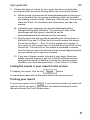
Choosing the events for your report
To choose the events you want listed in your report:
1. Choose List events from the Events menu or click on
Figure 52
The List events window opens.
46
.
User guide EN
RX
2. Choose the types of events for your report, the doors at which they
occurred and the time period during which they occurred as follows:
A) Whole groups of events can be selected/deselected by clicking on
one or several of the four group checkboxes which are located in
the heading of each column. These are: Status/errors, Door events,
Alarm and Card. All checkboxes are ticked when you open the
window.
B) Individual event categories can be selected/deselected by
ticking/unticking each checkbox. The meaning of each of the
checkboxes and the types of events that can be
selected/deselected are desribed on the next page.
C) Specify doors and time periods by adjusting the values shown in
the fields From and To. When the List events window first opens,
the values are Door 1 – Door 16 (or the highest door number in
your system if this is lower than 16) and the time from 00:00 on the
current day. The end time for the events is forwarded 5 minutes
from the time you open the window so that events happening while
you are setting up the report are included.
D) If you want Operator events included in your report (these are
details of people logging in and out of the RX software and any
changes they make), in addition to ticking the Operator events
checkbox, you must also select Door 1 in the From or To fields.
Listing the events in your report on the screen
To display your report, click on the
button.
A new window opens with all the event data for the chosen period.
Printing your report
To print your report, click on
. If you want to see what your report will
look like, before you print it, right-click in the window showing the event
data and choose the Print Preview option.
47
RX
User guide EN
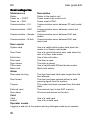
Event categories
Status/errors
Description
Status
Power on – CU/PC
Power on – DAC
Communication – CU
Status in the control unit.
Power reset in the control unit.
Power reset in DAC.
Communication errors between PC and control
unit.
Communication errors between control unit
and DAC.
Communication errors between DAC and
reader.
Communication errors between DAC and
motor lock.
Communication – DAC
Communication – Reader
Communication – M.lock
Door events
System card
Door Code
Exit button
Door open
Door closed
PIN events
Motor lock
Use of a valid/invalid system card when the
reader is in System card mode.
Use of a correct/incorrect door code when the
door is in Door code mode.
Use of the exit button.
The door is open.
The door is closed.
Use of valid/invalid PIN and duress codes.
Motor lock activity.
Alarm
Door open too long
Door forced
Tamper
External input
Door alarm
The door has been held open longer than the
time allowed.
The door has been opened without a valid
opening signal from the system.
The reader has been loosened from the back
plate.
The external input in the DAC is active.
All errors and alarms on the door.
Card
Valid
Invalid
Use of a valid card.
Use of an invalid card.
Operator events
Logging in and out of the system and any changes made by an operator.
48
User guide EN
RX
MAKING A BACKUP OF THE DATABASE
An important task for the operator in an access control system is to make a
backup of the database so that data can be restored in the event of a
system failure. This should be done regularly (once a week or more
frequently) so that all the latest updates are included.
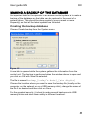
Creating the backup database
Choose Create backup from the System menu.
Figure 53
A new tab is opened while the system gathers the information from the
control unit. The backup is performed when the window above is open and
you click on OK with Save file selected.
The file is named backup_[today’s date]_[six digits]
Choose the location where you want to save the backup file (locally on the
computer, on the network or on a USB memory stick), change the name of
the file if so desired and then click on Save.
For the greatest security, it is best to make several backups onto USB
memory sticks and store them safely in different locations.
49
RX
User guide EN
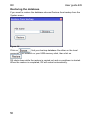
Restoring the database
If you need to restore the database choose Restore from backup from the
System menu.
Figure 54
Click on
, find your backup database file either on the local
computer, your network or your USB memory stick, then click on
.
RX shuts down while the restore is carried out and a countdown is started.
When the restore is completed, RX will restart automatically.
50
User guide EN
RX
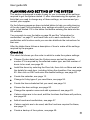
PLANNING AND SETTING UP THE SYSTEM
This section is designed to make it easy for you to choose all the settings
required to get the system started. If, after commissioning the system, you
think that you need to change any of these settings, we recommend you
contact your supplier.
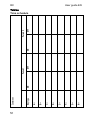
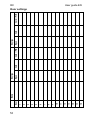
On the following pages we have included tables to help you with planning
of the day types, time schedules, door settings etc which you will need in
order to get started. Fill in the tables first before entering the data into the
RX software.
You may wish to copy the table on page 54 and the “Information for
cardholders” on page 71 and hand them out to each cardholder. For
cardholders with function cards you can also distribute the instructions for
their use.
After the tables there follows a description of how to make all the settings
required by the program.
Check list
This check list shows you the order in which to make the system settings:
Choose System data from the System menu and set the system
number if it is required by the selected reader type, and the number of
doors to be used, see page 55.
Install the doors by selecting the Door tab, then click on More and enter
the details for each door, including ticking the checkbox Use, see page
60. Also click on DAC and enter the desired settings, see page 65.
Create the calendar, see page 13.
Change to 8 day types if you need them, see page 56.
Create the time schedules that you need, see page 16.
Choose the door settings, see page 20.
Change the operator name and add a password, see page 83.
If alarm relays are to be used, add the functions that these will perform,
see page 66.
Add all cards and cardholders, see page 27.
If alarm controls are to be used, add the functions required for these,
see page 71.
Create a backup of the system, see page 49.
51
52
H=
G=
F=
E=
D=
C=
B=
A=
Day type
Comment:
ON
OFF
Period 1
ON
OFF
Period 2
RX
User guide EN
Tables
Time schedule
User guide EN
RX
Person/Door number
1
2
3
4
5
6
7
8
9
10
11
12
13
14
15
16
Who has access to which doors
53
54
16
15
14
13
12
11
10
9
8
7
6
5
4
3
2
1
Door
Name
Open
Day type
Card
Card +PIN
Open
Day type
Card
Card + PIN
RX
User guide EN
Door settings
User guide EN
RX
System data
The settings for a number of important system parameters are made in this
window, which you open by selcting System data in the menu System. We
recommend that you consult your supplier before making any changes of
the settings in the window.
Figure 55
Number of doors
This field states the number of doors installed in the system (from 1 to 16).
Enter the number of doors installed, this limits the number of doors shown
in the card table.
Figure 56
Language
In this field you choose the language in which the RX software is displayed
on the screen.
Figure 57
Open the drop-down menu by clicking on the arrow to the right of the field
and then click on your desired language.
55
RX
User guide EN
Time zone
RX needs to be configured with the correct time zone for the location of the
system, as this information is used, for example, in the event logs stored by
the system. When RX is delivered, its time zone is set to GMT +1 with
daylight saving (Central European Time). If the RX system is located in a
country with a different time zone then this must be changed in the
firmware.
From the drop-down menu you select the time zone for your location, note
that the same country can exist with different cities.
Figure 58
56
User guide EN
RX
XML export
XML export means that you easily can transfer your card database to
another system, for example ARX.
The file contains persons, cards and PIN codes from your system. Bear in
mind that the file isn’t encrypted and fully readable to anybody. Click on the
button
, click on Save and then brows to a suitable storage
location.
8 Day types
Here you can choose between 4 or 8 day types.
By default, the RX software provides 4 day types, A to D. If four is not
sufficient for your needs then click on this checkbox so it is ticked and the
software will provide 8 day types, A to H.
Figure 59
Card log only with active PIN
When this checkbox is ticked, the system will only log events where a PIN
code has been used.
Figure 60
Labels in the card database
These fields enable you to add your own labels to the last five fields in the
Edit card and New card windows. To change the labels, delete any existing
text and enter the new label (for example Mobile phone).
Figure 61
The labels and any data you enter in the fields are stored in the card
database.
57
RX
User guide EN
Date format
Here you can choose how you want dates to be displayed in the RX
software and in the reports from the event logg.
Figure 62
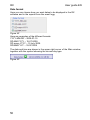
Here are examples of the different formats:
YYYY-MM-DD – 2009-07-15
DD-MM-YYYY – 15-07-2009
DD mmm YYYY – 15 July 2009
DD/MM/YYYY – 15/07/2009
The date and time are shown in the upper right corner of the Main window,
together with the symbol showing the current day type.
Figure 63
58
User guide EN
RX
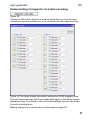
Global setting of magnetic card data encoding
Figure 64
Clicking on this button displays a window which tells you how the card
number and system number are to be encoded from the magnetic stripe.
Figure 65 The figure shows the default settings for ASSA magnetic card
The card format settings which you make here apply to the whole system
(global settings) in contrast to the card format settings that you can make
for each individual door.
Making changes for a specific door is described on page 69.
59
RX
User guide EN
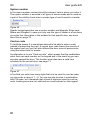
System number
In the case a system number should be entered, here is where you enter it.
The system number is encoded in all types of access cards and is used as
a part of the validity check when a certain type of card is used in a reader.
Figure 66
Reader technologies that use a system number are Magnetic Stripe card,
Mifare and Wiegand. In case you only use this type of reader in a few doors
you enter this information in the window for that specific door, see more
about this on page 70.
Card as code
To facilitate access it is sometimes desired to be able to enter a code
instead of presenting the card. A regular door code lowers the security of
the system and you can’t tell who entered the door since all persons are
using the same code for access.
An alternative is to use “Card as code”, which means that the cardholders
enter their own card number on the keypad and in the event log you can
see who opened the door. The function must also have a valid time
schedule for the current door, see page 71.
Figure 67
In the field you enter how many digits that is to be used for card as code;
you can enter a value of 1 – 9. You can use the function in combination
with PIN code, but it demands that at least 5 digits are used for card as
code. Leading zeros are not valid and are never entered on the keypad.
60
User guide EN
RX
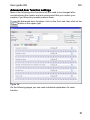
Advanced door function settings
Most of the following door functions will not need to be changed after
commissioning the system and we recommend that you contact your
supplier if you have any questions about them.
To see the advanced door functions, click on the Door tab, then click on the
button at the upper right.
Figure 68
On the following pages you can read a detailed explanation for each
function.
61
RX
User guide EN
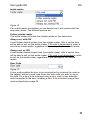
Use
Figure 69
This checkbox (if ticked) tells the system that the door is connected and
that the communication should be monitored.
Name
Figure 70
This field contains the name of the door – choose a name which gives a
good description of the door and its function. The name is displayed in the
Main window and in all event logs and reports which give information about
the door.
Card type
Figure 71
Used to set the card/reader technology that is used by this door’s reader.
Some technologies demand that you enter system number etc. If the same
type of reader is used through the whole system you make this setting in
System data under menu System, see page 59. If the reader type only is
used for this specific door you make the settings in this window by ticking
the checkbox Own card format followed by clicking on the button
. See more about this on page 69.
The different options are:
Magnetic card
(System number must be set.)
EM Prox
Mifare 20 digits
(Serial number reading, the system number should be set to 000254.)
Mifare 22 digits
(Sector number reading – system number must be set.)
Wiegand
(System number must be set.)
62
User guide EN
RX
Inside reader
Figure 72
If an inside reader is installed you can decide how it will operate with this
drop-down menu. The different options are:
Follow outside reader
The inside reader will mimic the outside reader on the same door.
Always out, with PIN
A card holder denied access from the outside reader, after a certain time,
will be able to exit via the inside reader. PIN code is demanded in order to
exit via the inside reader, regardless of the settings for the outside reader.
Always out, no PIN
A card holder denied access from the outside reader, after a certain time,
will be able to exit via the inside reader. PIN code is not demanded in order
to exit via the inside reader, regardless of the settings for the outside
reader.
Door Code
Figure 73
A door code enables the door to be unlocked just by entering the code on
the keypad, without a card read. Enter the door code you want to use in
this field. For a door to be unlocked using a door code, a time schedule
must be applied to the door: enabling a door to be unlocked using a door
code is described on page 20.
63
RX
Times
The button
User guide EN
opens a new window.
Figure 74
Bypass before unlocking
The number of seconds that the alarm is bypassed before the door is
unlocked.
Unlocked pulse
The number of seconds that the door will remain unlocked after a card
presentation or use of exit button.
Delayed locking
The number of seconds that the electric lock will remain unlocked after the
door is closed.
Allowed opening time before pre-warning
The number of seconds from the door being opened until the buzzer is
activated to warn that the door isn’t closed.
Warning time before alarm activation
The number of seconds from the buzzer being activated until the alarm is
no longer bypassed and a “door open too long” event is logged.
Bypass after closing
The number of seconds for which the alarm will remain bypassed after the
door is closed.
Buy alarm time
The number of minutes for which it is possible temporarily to turn off an
activated alarm.
64
User guide EN
RX
DAC
The
button opens the following window.
Figure 75
Two card function
If the Two-card function checkbox is ticked, two separate valid cards must
be presented to the reader for it to grant access.
Immediate unlocking (motor lock)
If this checkbox is ticked, the motor lock for this door will be unlocked and
relocked according to the “motor lock time schedule” applied to this door.
If this checkbox is unticked, the motor lock for this door will be unlocked
when the first valid access occurs (within the time schedule) at this door
and will then remain unlocked until the “motor lock time schedule” applied
to this door becomes inactive.
65
RX
User guide EN
Functions on extra relay board
Open the drop-down menu to set the Functions on extra relay board for
relays 1 to 4. The different options are described on the following pages.
Figure 76
66
User guide EN
RX
No function – The relay is not used.
01 Time controlled output – The relay follows “Schedule for output”.
02 Buzzer – The relay follows “Schedule for Buzzer”.
03 Temporary ABP – Temporary alarm bypass.
04 Door automatick – The relay is energised when everything is
unlocked (in other words when the motor lock and electric strike have
both released). When the door is “Unlocked according to schedule”, the
relay is energised when the exit button is used.
05 Door leaf position – Tells when the door is closed.
06 Security mode (motor lock) – Everything is locked.
07 Open mode (motor lock) – Everything is open.
08 Locked mode (motor lock) – Day locking
09 Electric strike – Follows the electric strike output.
10 Temporary ABP that stays active on door open too long
11 Tamper – The relay follows the tamper switch in the DAC.
12 Permanent ABP – The relay permanently bypasses the alarm.
13 Pre-alarm on alarm activation – Pre-warning before the alarm is
activated, at alarm.
14 Mirror blocking input in zone – Follows the blocking input in DAC
selected for the zone. (The relay is energised at closed input.)
15 Balanced OUT TAMP – Follows the tamper switch in DAC and
reader and also tamper on the micro switch input.
16 Balanced OUT ALARM – Gives an alarm (the relay is energised)
when a door forced event occurs. (Detector function.)
17 Disabled output – The relay is energised when a card with disabled
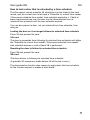
person’s authority is used at the reader.
18 Buzzer output. Always – The buzzer output is always active.
19 Follows day mode
67
RX
User guide EN
20 Door automatick with IR/Radar
21 Is energised on valid exit 4.5
22 Is energised on valid entry 0.1
23 Invalid card on addresses 0, 1, 4, 5
24 Motor lock problem
25 De-energised on door forced – Reset by closing the door
26 Disabled relay with time controlled deactivation – The same function
as Disabled output but the relay es de-energised after set unlock time,
for example 3 times 6 seconds. Also at door unlocked.
27 mirrors day/night mode without motor lock – Two electrical locks can
act as day and night locking. The relay follows the settings for motor
lock, for example to unlock at first valid access.
28 Day alarm – The Relay is energised and remains so at forced door.
Reset with valid card.
The balanced SW DIP6 must be in position ON in order for the activation of
the micro switch to operate as balanced 2k2 . See schedule in the user
guide for DAC.
68
User guide EN
RX
Door specific card format
Her you can set a specific card format for the current door. Ticking the Own
card format checkbox displays the Magnetic card data button.
Figure 77
Click on button to open the Magnetic card window.
Figure 78
If the reader installed at this door is of a different type from the others in the
system, enter the settings here.
If you need to change the card format settings globally for the whole
system, see page 59.
69
RX
User guide EN
Own system number
If the reader installed at this door requires its own system number, enter
the value here. Tick the checkbox and a field will apeare wher you can
enter the current system number.
Figure 79
If you need to enter a system number globally for the whole system, see
page 60.
Time schedule controlled door functions
Some door functions have to be assigned a time schedule during which
they will work. You do this at the bottom of the Door window using the dropdown menu for each function. Click on the different day type tabs to see
how the time schedule will operate on different days.
Figure 80
70
User guide EN
RX
Schedule for motor lock
The time schedule controlling the additional motor lock (if any) installed in
this door will unlock the motor lock according to the setting of the
Immediate unlocking checkbox in the DAC settings window, see page 65.
If this checkbox is ticked, the motor lock for this door will be unlocked and
relocked according to the “motor lock time schedule” applied to this door.
If this checkbox is unticked, the motor lock for this door will be unlocked
when the first valid access occurs at this door and will then remain
unlocked until the “motor lock time schedule” applied to this door becomes
inactive.
Schedule for output
If the function for any of the relays on the extra relay board is set to 01
Time controlled output (see page 66), the relay(s) will be energised when
this time schedule is active. You can choose any or all of the relays 1 – 4 to
follow the output time .
Schedule for buzzer
While this time schedule is active, the buzzer installed at a door will warn
when the door is open too long, or has been forced, or there is a motor lock
problem. (This feature requires readers with a built-in buzzer, or which are
connected to an external buzzer.)
Schedule for unlock from reader / Disconnect schedule from reader
This time schedule determines when it is possible to use a keypad code
and card to unlock a door, or to prevent a door from following its unlocked
time schedule, see pages 41 and 43 for details of how each of these
functions works.
Buy alarm time
This time schedule determines when it is possible to turn off the alarm for a
pre-set time. This function is useful when working overtime during hours
when the premises are usually alarmed. To set the time for which the alarm
can be temporarily turned off, see page 64.
Card as code
Here you select a time schedule determing when it should be possible to
use the function “Card as code”. In System data you enter how many
numbers that are to be used as code. When the function is active, both the
card and the keypad symbol are shown on the reader, in the same way as
when the common door code is active. The function can be combined with
PIN code under the conditions that at least 5 digits are entered as the card
code.
71
RX
User guide EN
Information for new cardholders
Before you present your card to the reader, it will display one of the
following three indications:
Green man
The door is unlocked and you may pass
through it without getting your card read.
Yellow arrow/card
Present your card to the reader. If it is a
magnetic card reader the black stripe
should be inwards and facing right.
Yellow arrow/card + Keypad Either present your card to the reader or
enter the four-digit door code on the
keypad.
After presenting your card or entering the door code, the reader will display
one of the following three indications:
72
Green man
The door is unlocked and you may pass
through it.
Red man
Access is not granted – your card is
invalid or you entered the wrong door
code. (The alarm may be activated.)
Keypad
Enter your personal identification number
(PIN) on the keypad – the green man
should then be lit and you can pass
through the door. If red man is lit you
have entered the wrong PIN.
User guide EN
RX
Card as code
When "Card as code" is used the following indications are displayed:
Yellow arrow/card + Keypad Enter your card number on the keypad.
After entering your card number the reader will display one of the following
three indications:
Green man
The door is unlocked and you may pass
through it.
Red man
Access is not granted – your card is
invalid or you entered the wrong card
number. (The alarm may be activated.)
Keypad
Enter your personal identification number
(PIN) on the keypad – the green man
should then be lit and you can pass
through the door. If red man is lit you
have entered the wrong PIN.
Two-card function
When "Two-card function" is used the following indications are displayed:
Yellow arrow/card
Present card 1.
After presenting card 1 the reader will display one of the following three
indications:
Green square flashes
Present card 2.
Red man
Access is not granted – your card is
invalid. (The alarm may be activated.)
Keypad
Enter your personal identification number
(PIN) on the keypad. If red man is lit you
have entered the wrong PIN.
When both cards have been presented (and possible PIN codes have been
entered):
Green man
The door is unlocked and you may pass
through it.
73
RX
User guide EN
Using function cards
Using an alarm card to switch the alarm on or off at a reader
A reader which is used to control an alarm has a symbol in the form of a
“square”. This shows the alarm status and if the symbol lits up red when
using the card the alarm is active. You are then denied access by the
reader. (The reader can have the setting to always show the alarm status.)
Cards with the authority Alarm can be used to turn the alarm on/off by
performing an alarm manoeuvre.
When you arrive to the building/zone and want to turn off the alarm:
When presenting the card the status indication shows red.
Press A, present the alarm card and enter your PIN code.
A+card+PIN
The status indication changes to green.
The alarm is deactivated and you can gain access by presenting your card.
(The reader can be set to unlock the door when you turn the alarm off. It
can also be set to turn the alarm off when you use your alarm card for
access.)
When leaving the building/zone and want to turn the alarm on:
When presenting your card the status indication shows green.
Press B, present the alarm card and enter your PIN code.
B+card+PIN
The status indication changes to red.
Bear in mind: Your PIN code is personal and should not be kept together
with the card.
74
User guide EN
RX
Setting/clearing a temporary door code using a caretaker card
One door code per card can be activated, with a maximum of 50 codes at
the same time.
Choosing and activating the temporary door code
Press 1A, present the caretaker card and enter desired door code.
1A+card+door code
The door code applies until it is deactivated.
Example:
To activate the door code 5379, press 1A+card+5379
Deactivating the temporary door code
Press 1B and present the caretaker card.
1B+card
The door returns to the currently scheduled function.
Deactivating the temporary door code at a specified time
The temporary door code becomes inactive when the caretaker card itself
becomes invalid. You can use this feature to deactivate the temporary door
code at a time of your choosing.
All you have to do is create a time schedule for the caretaker card with two
periods making the card invalid for at least one minute, for example:
Period 1 = 00:00 – 23:56
Period 2 = 23:58 – 23:59
Using these timings, the caretaker card will become invalid for one minute
at 23:57 (the card is valid up until 23:56 and then becomes valid again at
23:58). Because the temporary door code becomes inactive when the
caretaker card becomes invalid, the temporary door code will be
deactivated at 23:57.
You can choose other times of course, so the temporary door code stops
working whenever you want it to. For example, if you want the temporary
door code to become inactive at seven in the evening, choose settings for
the caretaker card time schedule as follows:
Period 1 = 00:00 – 18:59
Period 2 = 19:01 – 23:59
75
RX
User guide EN
How to set a door unlocked from the reader
The Unlock from reader 2A checkbox must be ticked in the card record,
and the current door must have a “Schedule for unlock from reader /
Disconnect schedule from reader” time schedule applied to it. If both of
these requirements are met, the door can be unlocked either until the time
schedule for that door re-locks it, or for a period of time of your choosing
which you enter into the keypad.
Unlocking the door without specifying a time
Press 2A, present the card and finish by pressing A.
2A+card+A
The green man is lit.
The door remains unlocked until the time schedule locks it again.
Unlocking the door for a specified time
You can enter the time as minutes or hours. For the system to know
whether you are entering minutes or hours the minutes are always entered
with a leading zero. The maximum unlocking time is eight hours.
To unlock the door for five minutes:
Press 2A, present the card and finish by pressing 05A.
(01 – 059 minutes can be entered.)
2A+card+05A
The green man is lit and the door will remain unlocked for five minutes.
To unlock the door for one hour:
Press 2A, present the card and finish by pressing 1A.
(1 – 8 hours can be entered.)
2A+card+1A
The green man is lit and the door will remain unlocked for one hour.
Returning the door to the current time schedule
Press 2B and present the card.
2B+card
If the door re-locks, according to time schedule, then the green man goes
out.
76
User guide EN
RX
How to lock a door that is unlocked by a time schedule
The Disconnect unlock schedule 3A checkbox must be ticked in the card
record, and the current door must have a “Schedule for unlock from reader
/ Disconnect schedule from reader” time schedule applied to it. If both of
these requirements are met, the door can be disconnected from its
unlocked time schedule until the time schedule expires.
You can also prevent a door, not yet unlocked by a time schedule, from
doing so.
Locking the door so it no longer follows its unlocked time schedule
Press 3A and present the card.
3A+card
The door is prevented from following its unlocked time schedule until either
the “Schedule for unlock from reader / Disconnect schedule from reader”
time schedule expires or until a Reset 3B is performed.
Resetting the door to follow its unlocked time schedule
Press 3B and present the card.
3B+card
The door returns to following its unlocked time schedule.
(A possible 2A manoeuvre made before 3A will be set to zero.)
The disconnection function also ceases to apply when the time schedule
for the function expires or makes a short break.
77
RX
User guide EN
ALARM SETTINGS
The alarm settings for your system will probably have been made by your
supplier and you shouldn’t normally change them. If changes are needed,
contact your supplier first to avoid possible negative consequences.
Alarm relays window
The Alarm relays window shows which events will energise each of the
three pre-set relays in the contorl unit and for how long.
Choose Alarm relays from the System menu.
Figure 81
The Relay output field shows which relay is connected to the event (0 in
this field means that no relay is connected to the event)
The Active for sec. field specifies how long the relay will be energised after
the event has occurred (1 – 65 000 seconds).
If this time is set to 0, the event requires a manual acknowledgement
before it is reset, as described in the next section.
78
User guide EN
RX
Acknowledging an alarm manually
If the Active for sec. field for an event is set to 0, the event causing the
alarm is not reset and the relay de-energised until the alarm is
acknowledged by the operator.
You can acknowledge an alarm by clicking on the flashing icon in the main
window (a yellow triangle with an exclamation mark).
Central alarm bypass
One of the pre-set log events is alarm manoeuvre, which means that you
can switch an alarm on/off from the reader. If this is connected to for
example relay 1 the relay cannot be used for anything else. When the
alarm manoeuvre is performed at any DAC with the setting for alarm
manoeuvre the relay in the control unit will be energised/de-energised.
Enter the relay (1 – 3) in the control unit that shall be used for the alarm
bypass. You then also select Blocking input in the drop-down menu
Programmable input. If your relay board is located in a DAC you don’t need
to change anything here.
Figure 82
Programmable input
RX has an input that can perform one of three functions, Lock all doors,
Unlock all doors or Blocking input (set/clear the central alarm bypass
manoeuvre). If you leave it set to Free input then the input state is recorded
in the event log.
To choose the function you want this input to perform, open the drop-down
menu for the Programmable input and click on one of the options.
Figure 83
The different functions are:
Free input – when the input changes an entry is made in the event log.
Lock all doors – when the input is activated, the system locks all doors and
blocks all the cards.
Unlock all doors – when the input is activated, the system unlocks all doors.
Blocking input – used when you chose to control the alarm via a relay
board in the control unit.
79
RX
User guide EN
Alarm zone window
Note! The settings in the Alarm zone window have an effect on many other
parts of the system – they should only be altered by your supplier since
they can affect the performance of the building’s intruder alarm.
Choose Alarm zone from the System menu.
Figure 84
The Alarm zone settings determine which relay is energised/de-energised
when an alarm manoeuvre is performed by the reader at Door 1, Door2,
etc. The reader at each door can be set to one of the following:
Not connected – cannot perform alarm manoeuvre, not part of the
alarm zone.
DAC 1 – 16 – perform the alarm function on an alarm relay in a DAC.
Control unit – perform the alarm function on a relay in the control unit.
80
User guide EN
RX
Make the settings for the alarm manoeuvre at each door
You need a relay board to control the alarm via a DAC420/430 or via the
control unit and on the relay board you find the alarm input (input 4).
In the drop-down menu to the right of the doors that’s part of the alarm
zone you select the alarm unit with the relay board installed, Control unit or
DAC 1 – 16. Doors that aren’t included are selected as Not connected, they
cannot be used for an alarm manoeuvre. But they will be blocked when the
alarm is active, unless you have ticked the checkbox No block.
Figure 85
If you have selected that the alarm bypass should be maid via a relay
board in the control unit you can also select if the blocking input should be
blocked or not by the alarm blocking input in the control unit. When the
reader is blocked access is denied. Doors that aren’t affected by the
alarmed zone can be ticked as No block, they can then be used for access
even though the alarm is active.
I the relay board is located in a DAC you get access to a number of other
settings, applying to all readers with the same DAC as an alarm unit.
Figure 86
Pulse – 1 – 2 seconds pulse on the ABP relay at alarm manoeuvre.
Inverted alarm input – inverted function of the input.
Permanent alarm status – the status is shown regardless of mode.
Alarm off at valid access – a valid access card also turns the alarm off,
without demand of an alarm manoeuvre.
Unlock with alarm manoeuvre - an alarm manoeuver also unlockes the
door for access, without having to present the card again.
Exit passage not blocked – makes it possible to leave an area when the
alarm is active, via reader or exit button.
If the Alarm TO checkbox is ticked, activating the alarm input will turn the
alarm on regardless of previus status.
If the Alarm ON/OFF checkbox is ticked, activating or deactivating the
alarm input will turn the alarm on or off, (toggle function).
81
RX
User guide EN
Figure 87
For the rest of the doors in the DAC there is only one choise, if the blocking
input (input 3 on the relay board in DAC420/430) should be blocked or not
by the alarm blocking input from the alarm controlling DAC, in this example
in DAC 1.
Door that aren’t affected by the alarm zone don’t need to be blocked when
the alarm is active. It could, for example, be an entrance door leading to a
hallway where there is another door before entering the zone with the
active alarm. The alarm is then turned off with the reader at this door.
Figure 88
82
User guide EN
RX
USERS/OPERATORS
Note! The terms “user” and “operator” are used interchangeably and mean
the same thing – a person who can log on to the RX software.
You can have up to five different users/operators in the system but only
one, User 1, has full authority to change all parts of the RX software (by
default User 1 is called master).
Changing the master operator name and password
Choose User from the System menu.
Figure 89
The first time you open the window the only user is master and there is no
password. The very first thing you must do is to change the Username to
your own and add a password to make the system safe.
Delete the name master from the Username field and type in a new name.
Then enter your desired password in both the fields: Password and Repeat
the password. When you type text into the password fields it is just
displayed as a number of dots for security reasons.
Note that both Username and Password are case sensitive.
When you have finished your alterations, click on the
button to save
the changes and close the window.
83
RX
User guide EN
Adding a new user/operator
Choose User from the System menu.
Type a new Username in the next available field, then enter the new user’s
password in both the Password field and the Repeat the password field.
Figure 90
Click on the
button to save the changes and close the window.
When you add a new user, the areas of the RX program that they can
access are restricted. Only User 1 has full unrestricted access to all of the
RX program and database.
Users 2 – 5 have limited authority which is sufficient for persons to
administer the cards in the system. These users have access to the
Person/Card screen and can create, edit and delete cards and cardholders.
When a card is created the restricted user can choose the access that the
cardholder can have at the different doors using the existing time
schedules, but he/she cannot create new time schedules or change
existing ones.
The only functions in the System menu which the restricted user can open
are Set system clock and Create backup.
Restricted users do not have access to the Door tab and therefore cannot
change the door settings.
84
User guide EN
RX
CHANGE IP ADDRESS MANUALLY
There are two different ways to do this, both using Telnet.
Configure Telnet
Start HyperTerminal by clicking on Start – Programs – Accessories –
Communications – Hyper Terminal.
Figure 91
Click on the Yes button if the above question appears.
If you have not used the Hyper Terminal before then fill in your location
information – follow the instructions on the screen.
Figure 92
Enter a name for your connection and select an icon, then click on the OK
button. We have called it coom2.
85
RX
User guide EN
Figure 93
In the next window click on the drop-down menu Connect using. Choose
the communication port to which RX is connected, in our example COM1.
Figure 94
The other fields are greyed out becuase they are now irrelevant. Click on
the OK button.
86
User guide EN
RX
Figure 95
You must also change the settings for the communication port. The settings
should be as follows:
Bits per second 9600
Data bits
Parity
None
Stop bits
Flow control
8
1
None
Now you have made these settings you can communicate with RX using
the Hyper Terminal program via the connected serial cable.
87
RX
User guide EN
Changing IP address with the computer directly
connected
Start by connecting the computer directly to RX with a serial cable. Then
start Telnet by clicking on Start -> Programs -> Accessories ->
Communications -> Hyper Terminal -> [name of connection].
Figure 96
When you press Enter the text in the figure above is shown. Enter the
following:
nv set ip <desired IP address>
Now press Enter. On the new line write reboot and press Enter again.
DIP1 should be in the ON position.
If you are connected via Ethernet you will get a message saying that the
connection has broken. To be able to connect via Ethernet, DIP1 and 6
must be in the ON position. Set them and then restart the control unit.
Note that DIP6 also will reset the master user (User1) to master without a
password.
88
User guide EN
RX
The new settings are now sent to RX and you can follow the progress on
screen.
Figure 97
89
RX
User guide EN
Changing IP address via the DOS prompt
Set DIP1 & 6 to the ON position. Start a DOS prompt by clicking on Start
and select Run…
Figure 98
Enter cmd and then click on OK.
Figure 99
Type telnet [IP address] (in the example above the IP address
is 192.168.1.250) and press Enter.
This starts Telnet and you can proceed as described earlier.
90
User guide EN
RX
FIRMWARE UPDATE
Because ASSA continuously develops its products, it is sometimes
necessary to update the firmware in order for the hardware to work at its
best. During an update the readers will not work, so we recommend that
you perform the update at a time when there is no need for anyone to gain
access to the premises.
When performing the update, you must make a backup of all your data as
described on page 49 (performing an update empties the entire memory in
the RX control unit so you must make a backup, then do the update, then
restore the data as described on page 50.)
Click on Firmware update in the System menu. You are automatically
reminded to perform a backup – if you have not already done so then you
can do so now.
When you have made your backup, the Firmware update window is
displayed:
Figure 100
Click on the
button and locate your new firmware file. (It is a zip
file and it should not be unpacked.)
When the new firmware file is displayed in the File name field, click on the
button.
The new software is sent to the RX control unit and all the readers
connected to it start blinking. After a while, a screen is displayed in your
browser which counts down to the restart. When the update is finished, RX
restarts. You can now restore your database as described on page 50.
91
RX
User guide EN
RESETTING THE LOGIN INFORMATION
You can reset the login information to how it was when the system was first
delivered as follows:
1. Switch off the power to the control unit.
2. Set DIP6 in RX to the ON position.
3. Switch the power back on.
4. When the blue “WDOG” LED starts to flash quickly, switch the power off
again.
5. Set DIP6 to the OFF position.
6. Switch the power back on.
The system is now returned to having just one user (User 1) called master
and there is no password.
Note that you must not alter any other DIP switches or you risk
emptying the control unit of all information.
92
User guide EN
RX
Your notes
93
RX
Your notes
94
User guide EN
User guide EN
RX
Your notes
95
RX
Your notes
96
User guide EN