1
Program Mode
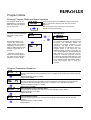
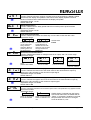
Entering Program Mode and basic operation
The Program Mode can be
accessed from the Operation
Mode by holding the Program
Key for 3 seconds.
⇑
⇓
for 3 secs.
The name of the first parameter
will appear on the primary
display.*
Successive presses of the
Program Key will scroll the
display through the remaining
parameters in the Program
Mode. To exit Program Mode,
hold the Program Key for 3
seconds.
N3'
The Program Mode can be exited by holding the Program
Key for 3 seconds or remove power from the unit and
repower it.
After 90 seconds of key inactivity the unit returns to
Operation Mode automatically.
3 secs. or
Edit Operation
Q R
⇐
⇒
= N )
* Parameter names will not
appear on the main display if
the „Help“ function has been
disabled in Program Mode
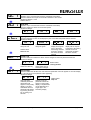
Pressing the Scroll Key or no key activity
for 3 seconds will display the value for that
parameter. The secondary display will
indicate the one-digit identifier for the
parameter. The digit in the secondary
display will flash to indicate the unit is in
Program Mode. If the Scroll Key was
pressed (instead of waiting 3 seconds), the
unit is in Edit Operation, as indicated by the
MSD flashing. If there had been no key
activity for 3 seconds, press the scroll key
to enter Edit Operation (MSD flashing). Use
the scroll and edit keys to change the value
as in Operation Mode, described on page 5.
Press the Program Key to enter any
changes.
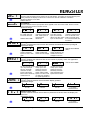
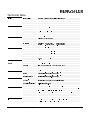
Program Parameter Sequence
N3' 3
= N )=
+3') +
+3' +
Count Calibration Factor
Function: Scales the input into engineering units by multiplying this value by the number of pulses
received.
Adjustment Range: 0.0001 to 9.9999
Default Value: 1.0000
Decimal Position
Function: Set the decimal point position for the count display. The setting of the count decimal
point merely switches the display dot and has no influence on the calibration calculation.
Adjustment Range: 0 (no dp) to 0.0000
Default Value: 0 (no dp)
Rate Calibration Factor Decimal Point
Function: Sets the decimal point position for the rate calibration factor display.
Adjustment Range: 0 to 0.0000
Default Value: 0.0
Rate Calibration Factor
Function: Used to scale the input inti engineering units by multiplying this value by the input
frequency
Adjustment Range: 0.0001 to 99999
Default Value: 1
2 735 051, Rev. 030798
Operating Instructions tico 735 - Rate Meter with Totalizer
page 7/12