1
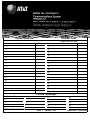
TELEPHONE
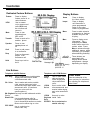
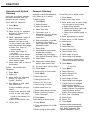
Dedicated Feature Buttons
Feature
Press to display
feature screen or to
select features.
HFAI
Use to answer
voice-announced
calls. HFAI must
be on before call
comes in.
Mute
Press to turn
speakerphone
MIC on/off.
Transfer
Press to send call to
another phone.
Speaker
Press to turn
speakerphone on/
off .
Conf
Press to add person
to a conference.
Drop
Press to disconnect
person from
conference call.
Hold
Press to put call on
hold.
Display Buttons
Home
Press to display
the Home screen.
Inspct
Press to display
call information or
press programmed
button to see what
feature is programmed.
Menu
Press to select extension
programming or features
available only from the
display.
More
Press to display more
information. The >
displays by the More
button when more information exists. Press
More to advance through
additional menus, when
necessary (for example,
when selecting features).
<Soft
These buttons are
Buttons > associated with
display labels. Button
assignments change
Message Light Line Buttons
depending on display.
● MLX-28D: 28 (shown)
● MLX-20L: 20
● MLX1OD: 10
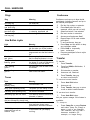
Line Buttons
Telephones with SA Buttons
Telephones with ICOM Buttons
SA Ring
ICOM
Ring
Use to make inside
calls and receive
inside ringing and
voice-announced
calls.
ICOM
Voice
Use to make inside
voice-announced and
receive inside ringing
and voice-announced
calls.
SA Voice
Use to make/receive inside/outside
ringing calls and recieve inside
voice-announced calls.
Use to make and receive outside
calls, receive ringing and voice
announced calls, make inside voice
announced calls. (Co-workers
hear your voice over the
speakerphone.)
SA Originate Use only to make inside and outside
Only
calls.
Shared SA Use to make/answer calls for
co-workers or join conversations.
Line is shared with another co-worker.
Button can be either ring or voice.
555-XXXX Use to make/receive
outside calls only.
ICOM
Use only to make
Originate inside calls.
Only
555-XXX Use to make/receive
outside calls only.
Desk Stand
See the underside of the
user card tray for instructions
on adjusting the telephone’s
desk stand.