1
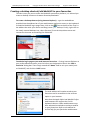
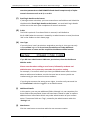
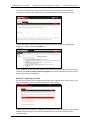
bksbLIVE (PLTS) User Guide Copyright © 2013 Vision West Notts College Support: 01623 413333 (A) Username This is the single most important piece of information when creating an account and it is vital that each student, tutor or administrator is given a UNIQUE identifier to ensure data integrity. Also, dependent upon your company data protection policies, to maintain compliance with the Data Protection Act (where a company must take all reasonable steps to ensure privacy of data), it may be necessary to assign a random code or other reference, rather than simply entering the student’s name and date of birth. (B) First Name Enter the First Name with no apostrophes, accent marks or other unusual characters (e.g. Amélie should be written Amelie without the accent). Note that hyphenated first names (such as Ella-Rose) ARE permissible. Apostrophes, accents and other non-alphanumeric characters in names can cause issues when running reports. (C) Last Name Enter the Last Name, with no apostrophes, accent marks or other unusual characters. (O’Sullivan should be written as OSullivan without the apostrophe). Note that hyphenated surnames (such as Carter-Brown) ARE permissible. Apostrophes, accents and other non-alphanumeric characters in names can cause issues when running reports. (D) Email Adding an e-mail address here serves two purposes. Typing an e-mail address here makes it possible for the student to recover their log-in details should they forget them. If, during the account activation, you have entered an e-mail address and also ticked the box titled ‘Email login details to the learner’, an email containing their log-in details and web address to access the bksbLIVE account will be dispatched to the student upon completion of account activation. A student can add an e-mail address later if necessary via their student home page after logging in. (E) Password By default, if this field is left blank AND the checkbox titled ‘user must change password at next login’ is ticked, then the user is given the generic password of ‘password’ (all lower case) and will be prompted to change it on first log-in. However, if you decide to give the user a specific password, enter the password AND un-tick the box titled ‘user must change password at next login’. Please [9]