1
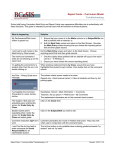
When you start Microsoft Word you should then find a new Ribbon called Report Comment Bank
Usage
Before you begin to use the toolbar you should:
Create an account at www.reportcommentbank.co.uk (check your email for activation code)
Organise your subject tabs:
a. Choose your subject
b. Possibly add shared comments
c. Hide the tabs you don’t want
d. Drag the tabs in the order you want them in – this order is how they will
automatically “flick” in the toolbar
e. Save your configuration for future use
1) Create an account / login
If you have not already done so then your first step is to create and activate
(check your email) an account at www.reportcommentbank.co.uk . Once you
have done this you can login by using the email and password you chose.
2) Enter pupil name, choose subject and gender
2
www.reportcommentbank.co.uk