1
Table of Contents
Introduction – About This Guide and the Voyant Advisor Introductory Tutorials ........................................ 1
Questions, Assistance?...................................................................................................................................................................... 1
Before Beginning... Have You Installed Voyant Advisor? ................................................................................... 2
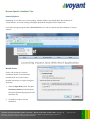
Browser-Specific Installation Tips ......................................................................................................................... 3
Internet Explorer ............................................................................................................................................................................... 3
Mozilla Firefox..................................................................................................................................................................................... 3
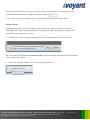
Google Chrome ................................................................................................................................................................................. 4
Getting Started - Launch Voyant Advisor ........................................................................................................... 5
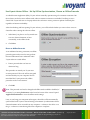
Use Voyant Advisor Offline – Set Up Offline Synchronisation, Choose an Offline Passcode ........................ 6
Enter an Offline Passcode ................................................................................................................................................................ 6
Preferences – Activate Offline Mode Anytime After Installation, Update Your Offline Passcode ................................ 7
Create a New Client Case File – The Open Client Record Dialog ................................................................... 8
Enter the Basics ....................................................................................................................................................... 9
Select a Start Date ............................................................................................................................................................................. 9
Clients – John and Julia Campbell ................................................................................................................................................ 10
The Planning Timeline ......................................................................................................................................... 13
Preferences – A Quick Check for Matching Default Settings .......................................................................... 17
An Important Note About the Numbers .................................................................................................................................. 18
Employment Income ............................................................................................................................................ 19
John's Employment .......................................................................................................................................................................... 19
Retirement Savings - John's 401(k) Plan ..................................................................................................................................... 20
Julia's Income ..................................................................................................................................................................................... 22
Retirement Savings - Julia's 403(b) Plan ...................................................................................................................................... 23
Linking .................................................................................................................................................................... 24
Use Link Icons to Jump to Linked Items on Other Screens.................................................................................................. 24
VOYANT ADVISOR INTRODUCTORY TUTORIAL – BUILD YOUR FIRST CLIENT CASE
(Tutorial 1)
Voyant, Inc. proprietary information which is privileged, confidential, or subject to copyright belonging to Voyant, Inc.
Use of this information is solely for the recipient of this document.
Voyant, Inc. 2011
i