1
2. Home Page
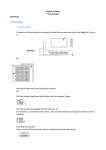
Once logged in you will be directed to your home page as shown below.
You have 3 options:
1. Settings
2. Lists
3. Status
The Settings tab is used to customize you extension account. You can change
passwords, set your name, redirection preferences, control mailbox and modify other
items related to your account.
In the Lists you can see the content of your mailbox, missed calls and an overview
on all calls. This area also contains your personal address book.
The Status tab shows you an overview on your account settings and other useful
information like registered user agents.
NOTE: Clicking: Home at the bottom of every page will take you back to this page.
4
SIP_COM_V4PBX_version1