1
At a glance
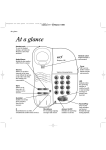
Start button A
Lets you store numbers
under the one-touch
memory buttons.
See page 9,11,12
Handset clip
Rotate for wall
mounting to secure
handset firmly in
position.
See page 20
SET UP
© TO START
PRESS 'A'
AND FOLLOW
THE ARROWS
RECALL
© KEY-IN THE
NUMBER
YOU WANT
TO STORE
CLR.
2
3
B
G
P
6
W
TU
9
Discount
PRESS ‘C'
Telephone No.
label
✱
SECRECY
1
0
▲ ▼ Up and Down
scroll buttons
Provides access to
and lets you scroll
through the caller
display list.
See page 14
C
ACCOUNT NO.
Secrecy button
(& light)
Allows you to talk to
someone in the
same room, without
your caller hearing.
See page 10
X YZ
8
V
RS
7
M
JK
5
NO
4
Q
© WHEN YOU
WANT TO
INFORM ‘B'
OF THE
NUMBERS
THAT
QUALIFY
FOR YOUR
L
HI
NO............................................
D
AB
1
EF
© TO CONFIRM
THE NUMBER
PRESS ‘B'
Display
Shows Caller
Display information,
stored/dialled
phone numbers.
Clear button
Lets you delete
entries from the
caller display list.
See page 15
© SELECT ONE
OF THE TEN
MEMORY
KEYS
DIAL
Dial button
Press to dial
displayed numbers.
See page 15
Relate 700 CD
A
C
Recall button
Lets you use BT
Select Services and
services with
switchboards/PBXs.
See page 12
One-touch memory
buttons 1-10
Allows one-touch dialling
of stored numbers (each
up to 24 digits).
See page 9
....................
REDIAL
Call My Bill
....................
C button
Lets you register a
number for a Friends &
Family discount. Can be
used as an extra direct
memory button.
See page 9,11,12
Redial button
Redials the last
number called.
See page 8
Confirm button B
Confirms that you
have stored a number.
See page 9,11,12
Call My Bill
button
Press for billing
information. Can be
overwritten and used
as an extra direct
memory button.
See page 11


![Converse 220 user guide [ROLL]](http://vs1.manualzilla.com/store/data/006893753_1-a5f5b41a1871906539e8cdcfce1420ae-150x150.png)