1
CPA6
STEP
KEYPAD
DISPLAY
KEYPAD
OPERATION
READOUT
OPERATION
Comments
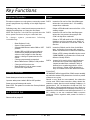
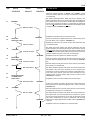
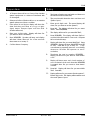
Enters the required method of ‘SETTlNG" and “OPENING” control
(shunt-Lock or Auto. Ex/En.) into memory and initiates the next step of
Commissioning.
37
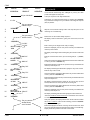
The display awaits information. Timed exit may be applied to the
system regardless of the access method used. The Alarm System will
set at either end of the time period, provided that the installation is
secure and all circuits are healthy. If any faults exist, the system will
‘latch’ into fault. Where timed exit is not required, then the display is left
as “0000" and the ”YES/ENTER" key pressed.
“YES/ENTER”
“Exit time? 0000”
38
39
“YES/ENTER”
KEY-IN EXIT
TIME IN SECONDS
As keys are pressed, the display will show the exit time being set in
seconds. When correct, press the “YES/ENTER” key.
Registers the exit time in the panels memory and initiates the next
commissioning step.
“Exit time? 00YY”
40
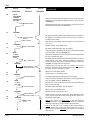
The display shows this question and waits for information from the
keypad. If entry to the alarmed premises (to open the alarm system)
does not require timing, then the display time is left as “0000" and the
”YES/ENTER" key operated. If entry to the premises is to be timed, then
enter the required entry time, in seconds, via the keypad.
“YES/ENTER”
“Entry time? 0000”
41
42
“YES/ENTER”
KEY-IN ENTRY
TIME IN SECONDS
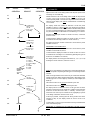
Enters the displayed entry time into the panel’s memory and initiates
the next step of commissioning.
“YES/ENTER”
Bell delay? 0000”
The display shows this question and waits to receive information from
the keypad. If the main alarm sounders are to be delayed from
operating on an alarm activation, then enter the required delay time,
in seconds, via the keypad. If the main alarm sounders are to be
instant-on-alarm, then the display digits are left as “0000 and the
”YES/ENTER" key operated.
44
45
Registers that the alarm system has “infinite” entry time.
As keys are pressed, the display will show the entry time being set in
seconds. When the displayed time is correct press the “YES/ENTER”
key.
“Entry time? 00YY”
43
Registers that the system does not have timed exit.
KEY-IN MAIN ALARM
SOUNDER DELAY
IN SECONDS
Bell delay? 0YYY”
Registers that the main alarm audibles are instant-on-alarm.
“YES/ENTER”
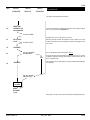
As Keys are pressed, the display will show the sounder-delay time
being set in seconds. When the displayed time is correct, press the
“YES/ENTER” key.
46
“YES/ENTER”
Enters the displayed alarm sounder delay into the panel’s memory
and initiates the next step of commissioning.
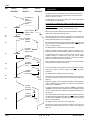
Bell dur.? 0000”
47
“YES/ENTER”
The display shows this question and waits to receive information from
the keypad. If the main alarm sounders are to operate for a specific
time, then enter the required time, in seconds, via the keypad. If the
main alarm sounders are to operate continuously, until manually
reset, then the display digits are left as “0000" and the ”YES.ENTER" key
operated.
Registers that the alarm audibles are to manually reset.
496524 Issue A
11 of 16
CPA6