1
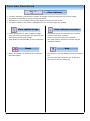
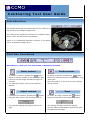
Tool bar functions Slice indicator The slice indicator indicates the number of images in the exercise and the current image. Use the slice indicator to scroll through the slices. Alternatively, you can scroll through the slices using the mouse wheel. The active contour will remain highlighted as you scroll through the images. View sagittal image Select this button to view a sagittal image with reference lines showing the position and orientation of the axial images. This option is not available in some exercises. Reset Select this button to delete all the contours and start again. View reference contours Select this button to compare your outlines with the reference contours. Scroll to view the reference contours. The most inferior reference contour will be displayed initially. Help The Help box can be displayed during contouring. To move the open Help box out of the way, left-click on the box and drag. Page 2