1
• ASP_GRID_INTERPOLATE: Uncomment the ASP_GRID_INTERPOLATE to more
accurately calculate the distance between atoms for the calculation of the score. Grid points
surrounding atoms are used to interpolate a more exact atom location. This will give a similar
effect as increasing the grid density.
• ASP_MAX_DISTANCE: Default 6.0. The max distance set for interaction between ligand and
protein atoms.
• ASP_GRID_LOOKUP: This setting is on by default, the score is evaluated from the generated
grid points.
• ASP_DIRECTORY: Default: DEFAULT. Sets the location of the ASP potentials, by default the
location is $GOLD_DIR/gold/asp_tables.
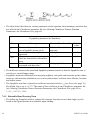
• TARGETED_ASP_DIRECTORY. Uncomment this parameter to specify the location of
customised targeted ASP potentials. (see Targeted Scoring Functions, page 89).
• SAVE_ASP_MAPS: Default 0. If set to 1 the map generated for each ASP ligand atom type is
printed out.
7.6
User Defined Scoring Function
• In addition to the choice of scoring functions provided, i.e., GoldScore, ChemScore, ASP, and
CHEMPLP users can also implement their own scoring function.
• The GOLD scoring function Application Programming Interface (API) allows users to modify
the GOLD scoring-function mechanism in order to:
• Calculate and write out additional data after each docking
• Add extra terms to the scoring function
• Implement a completely new scoring function
• Full documentation for the GOLD Scoring Function Application Programming Interface (API)
is provided with the GOLD distribution:
• UNIX: $GOLD_DIR/gold/api_doc/index.html
• Windows: <InstallDir>/GOLD/gold/api_doc/index.html
where <InstallDir> is usually C:/Program Files/CCDC/GOLD_Suite
• See: GOLD Scoring Function Application Programming Interface (API) documentation.
• A good knowledge of the C programming language is required together with some experience in
using GOLD.
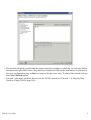
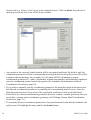
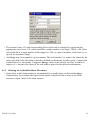
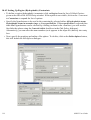
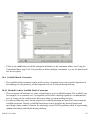
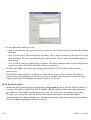
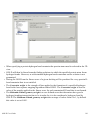
• Click on Fitness and Search Options from the list of Global Options given on the left of the
GOLD Setup window and select User Defined Score from the drop-down menu.
• The Scoring Function Shared Object (UNIX) or Scoring Function DLL (Windows) is used to
specify a path to a dynamically loadable shared object library. Either enter the path and filename,
or click on the ... button and use the file selection window to choose the file.
• GOLD uses shared objects (or dynamically loadable libraries) to allow new or modified scoring
GOLD User Guide
91