1
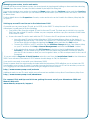
Icons & Menus
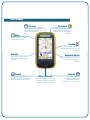
GPS Lock
Menu
Go to mark
Shows your current position
on screen and automatically
scrolls the map as you move
Shows a list of the nearest
marks and waypoints to your
location. Tap on one to begin
navigation
Expands the icon menu to
provide more options
Position
Your current location. The arrow
indicates the direction you are
heading in
Heading
Navigation Display
Displays the heading to take
to reach the next mark or
waypoint
Zoom in
Tap to zoom into the map. If
available, more detailed maps
will be displayed as you zoom in
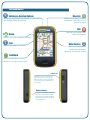
Displays navigation information
to reach the next mark or
waypoint
Battery Indicator
Glows blue to indicates the battery
is charging. The light will go out
when the battery is charged
Zoom out
Tap to zoom out from
the map. If available, less
detailed maps will be
displayed as you zoom out