1
SMH10
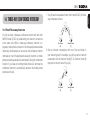
You can easily adjust the volume by rotating the Jog Dial. You will
hear a beep when the volume reaches maximum or minimum level.
The volume is set and maintained independently at different levels
for each audio source even when you turn off and on the headset.
For example, once you set the volume for mobile phone handsfree,
it will not change even if you adjust the volume when you hear
Bluetooth MP3 music. So you can always maintain the preferred
optimum volume level for each audio source.
6. PAIRING THE SMH10 WITH BLUETOOTH DEVICES
English
5.VOLUME ADJUSTMENT
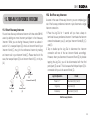
Before using the SMH10 Bluetooth headset with any of Bluetooth
devices for the first time, you need to do the pairing operation. It can
be paired with Bluetooth mobile phones, Bluetooth stereo devices
such as MP3, or motorcycle specific Bluetooth GPS, and with other
Sena Bluetooth headsets. This pairing operation is only required
once for each Bluetooth device. The headset will remain paired with
the devices and automatically connects to the paired devices again
when they are within range. You will hear a high tone single beep
and a voice prompt when the headset connects to the paired device
automatically: “Phone connected” to a mobile phone, “Media
connected” to a Bluetooth stereo device.
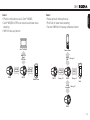
6.1 Mobile Phone Pairing
1. Turn on the SMH10 and press the Phone Button for 5 seconds until
the LED flashes red and blue alternately and you hear multiple
beeps. You will hear a voice prompt saying “Phone pairing”.
2.Search for Bluetooth devices on your mobile phone. Select the
Sena SMH10 in the list of the devices detected on the mobile
phone.
11