1
SMH10
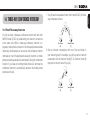
“Hello” or any other word loudly. This is enabled from the factory but
you can disable this. If this mode is disabled, you have to tap the Jog
Dial or the Phone Button to answer an incoming call.
9.2 Enabling/Disabling Voice Activated Intercom
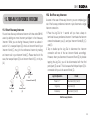
9.3 Enabling/Disabling Voice Prompts
Voice Prompt
“VOX intercom”
Factory Default
Disable
Voice Prompt
Enable
Tap the Phone Button
Factory Default
Enable
Tap the Jog Dial
Enable
Tap the Phone Button
Disable
Tap the Jog Dial
Disable
If this feature is enabled, you can initiate an intercom conversation
with the last connected intercom friend by speaking any word loudly
enough.The most effortless way to trigger intercom VOX is to blow
into the microphone as if blowing dust off the microphone. If you
start an intercom conversation by VOX, the intercom terminates
automatically when you and your intercom friend remain silent for 20
seconds. However, if you manually start an intercom conversation by
tapping the Jog Dial, you have to terminate the intercom conversation
manually.
However, even when this feature is enabled, if you terminate intercom
conversation manually with the Jog Dial, you are not able to start
intercom by voice temporarily. In this case, you have to tap the Jog
Dial to restart the intercom. This is to prevent repeated unintentional
20
intercom connections by strong wind noise. If you tap the Jog Dial to
start an intercom conversation, it is not terminated by 20 seconds of
silence. After turning SMH10 off and on, you can start intercom by
voice again.
“Voice prompt”
You can disable voice prompts by configuration setting, but the
following voice prompts are always on.
- Voice prompts for configuration setting menu
- Voice prompts for battery level Indicator
- Voice prompts for factory reset
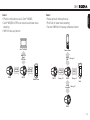
9.4 Delete all Bluetooth Pairing Information
Voice Prompt
“Delete all pairings”
Factory Default
N/A
Execute
Tap the Phone Button