1
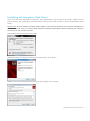
Integrator Setup will now run through the setup. Once it has completed you can click "Done".
Signing in
To get up and running with Integrator, you'll need to enter your username and password please note these are different than the Portal login details. Please speak to your Administrator
if you don't have your log in details.
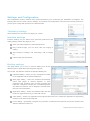
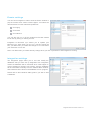
The details can be entered by right clicking the Integrator icon in your taskbar and selecting
'Configuration'.
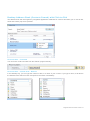
From there, select 'Telephony' and enter your username and
password. The directory mode will default to group; we'll touch
on this later in the 'Presence' section.
You'll also need to specify your location, select your country
and area code from the drop down list and click 'Save' - you
should now be ready to go.
Passw ords
A single password (that is separate to a user’s Horizon portal password) is generated per user by the system
for use with ALL software clients (Integrator, Integrator CRM, desktop soft client and the mobile soft client). If a
user is using more than one client (Integrator and the mobile soft client, for example) then only the assignment of
the first client will result in a password being generated; this will be received before a confirmation email with
download instructions. For all subsequent clients, only the confirmation email will be sent.
Integrator Soft Client User Guide v1.0