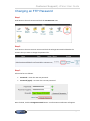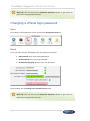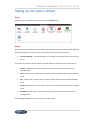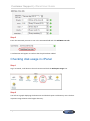
1
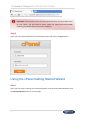
Customer Support | cPanel User Guide Changing an FTP Password ...................................................................................................................30 Changing a cPanel login password .........................................................................................................31 Setting up cron jobs in cPanel ................................................................................................................32 Checking disk usage in cPanel ...............................................................................................................33 Finding additional help for cPanel ...........................................................................................................34 Direct Links .......................................................................................................................... 34 Introduction cPanel is a powerful and intuitive web interface that enables you to provide your customers with an easy way to administer their websites, databases and email addresses. This guide will cover all the basics needed in order to get starter with cPanel. Before you begin Before you begin you will need to make sure that you have the following details at hand: A cPanel account provided by your WHM Administrator. The login details for cPanel provided by your WHM Administrator. Using cPanel Once you have created your first account in WHM, both your users and you will have access to the cPanel interface for that account. Logging into cPanel Step 1 If the domain’s DNS is handled within cPanel browse to cpanel.yourdomainname.com replacing yourdomainname.com with the domain that you want to access the cPanel interface for. Page 2