1
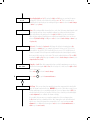
R eceiver sensitivity starts off at 5% and output power starts at 10%. The beam will start by raising its sensitivity
first and can rise all the way up to 100%, after this the output power will rise. The objective of pre-alignment is
to adjust the output power to the correct levels for the distance to be covered. As there is no reflector we are
looking for a reflection off the far wall. Power levels will rise until they reach a maximum of anything up to 6
to 7% of received signal strength (nb. figures may fluctuate between these values), once this is achieved the
power level will automatically stop rising any further.
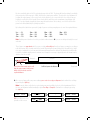
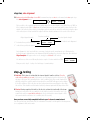
By looking at the table below you need to judge if you are receiving enough power to cover the required distance.
5 m.........5% 10m.......10%
20m.......15%
30m......20%
40m......25%
50m......30%
60m......40%
70m......50%
80m.......60%
90m......65%
100m....75%
Note: Anything more than these levels is good and continue down to 9. If you are receiving noticeably less read
on below.
These figures are approximate but if you are receiving noticeably less than these figures you may be receiving a
reflection from an object nearby and not the far wall. By moving the beam (looking at the far wall) left (x-) right
(x+) up (y+) and down (y-) you can move the beam path away from the obstacle. By doing this you will be able
to achieve a suitable output power. In extreme cases it may be necessary to physically move the beam head to
obtain a clear line of sight.
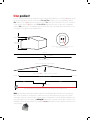
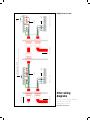
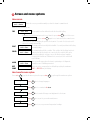
Obstacle
Reflections from nearby objects will
limit the output power and prevent
ability of the beam to cover the
required distance
Roofline
Sufficient power for distance
Target wall
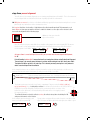
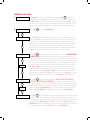
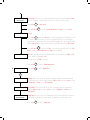
9. Once you are happy with your power readings press enter to accept pre-alignment and confirm these settings
by pressing the right key.
Note: It may be that no reflection is received and power and sensitivity levels rise to their maximum, if this is
the case pre-alignment will automatically register Pre-Align - Complete. Confirm these settings by pressing
the right key.
10.0% 100% 6% P
X+0.000 Y+0.000
enter
OR If no reflection is seen
you will see this screen.
Press
(right)
to confirm
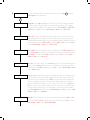
right
Manual Alignment
enter
Manual
X+0.000
AQ
6%
Y+0.000
Pre-Align - Complete
Press
(right)
right
Manual Alignment
enter
Manual
X+0.000
AQ
6%
Y+0.000