1
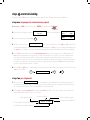
stage three, manual alignment
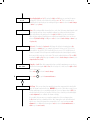
Y ou will now see the manual alignment screen showing anything between 0 and 6%. This is the amount of
received signal with no reflector that the beam is picking up from the environment.
10. NOW place or uncover the reflector on the blank wall directly opposite the beam head ensuring there is a clear
path through any obstructions such as structural steels etc.
It is important that there is a clear line of sight between the reflector and beam head. The beam must see at
least 200mm of clear space around the reflector to enable the beam to see the edges of the reflector to allow
successful auto alignment in the following stage.
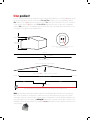
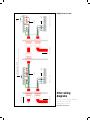
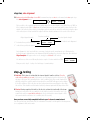
200mm of clear space from the
edges of the reflector
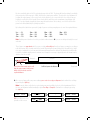
Once the reflector is in place and visible there should be a big jump in the received signal (AQ). This means
that the head is seeing and receiving a signal back from the reflector. In most cases this will result in a
received signal of over 100%. Manual
AQ 136%
Manual
AQ 13%
X+0.000
Y+0.000
3
X+0.000
Y+0.000
7
As long as there is a received signal of over 40% you can move onto the next stage: Auto Alignment,
No.11.
If the AQ reading is below 40% it means the head is not seeing the reflector and will abort Auto Alignment.
The next stage is to manually move the beam to achieve an AQ reading of over 40%, ideally over 100%.
The higher the AQ the quicker it will auto align. This is done by manually moving the x and y motors to
obtain a received signal from the reflector.
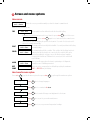
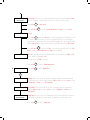
In the example below we can see that the reflector is below the eye line of the beam head, so in this case you
would need to lower the angle of the beam (-Y) until you receive an AQ of over 40%.
Beam head
Reflector is lower than the beam head... use -Y to bring the beam onto the reflector
Reflector
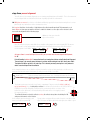
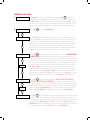
The beam can be moved on both X and Y axis to a maximum 5 degrees using the left (x-), right (x+),
up (y+) and down (y-) keys. Looking at the reflector this will move the beam across the reflector like so...
y+
Holding the keys down will quickly scroll through to your desired position, on release of the
button the screen will revert to the actual beam position and can be seen stepping toward
the requested position.
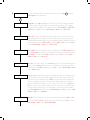
xTo confirm the beam is seeing the reflector covering the reflector at any time should drop the AQ
and prove the beam is on the reflector.
yTry and achieve as high an AQ as possible, it must be over 40% to auto
In the example above moving the y axis
align. The higher the AQ the quicker the auto align, above 100% is good
down (y-) results in a greater AQ
Manual
X+0.000
AQ 6%
Y+0.000
down
Manual
X+0.000
AQ 110%
Y-2.260
down
x+