1
+-
C+
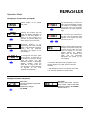
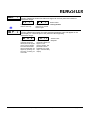
Front Panel Reset Enable
Function: Determines whether the Front Panel Reset key can be used to reset the time
value.
Adjustment Range:
C
3DE- N
+
Enable: The count value
can be reset while being
viewed in Operation
Mode by pressing the
Front Panel Reset Key
=-
+
Disabled: The Front
Panel Reset Key is
disabled and the count
value can only be reset
through the Remote
Reset Input
Default Value:
Enable
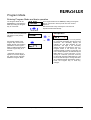
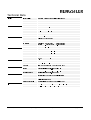
Serial Communication enabled (Appears only if a communication board is installed and
activated).
Function: Activates the RS-485 communication option board.
Adjustment Range:
Default Value: If ordered from the factory
N
N
CC
"/
with the RS-485 board, the default will be
„Fitted“. If the board is installed in the
None: no communicaFitted: A communication board installed
tion board is installed
field, this parameter will need to be
in the unit
changed from its default of „none“.
==+
1=
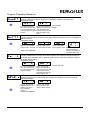
Communication Address
(Appears only if communication board is installed and activated)
Function: Defines the unique communication address of the counter
Adjustment Range: 1 to 99
Default Value: 1
Baud Rate
(Appears only if communication board is installed and activated)
Function: Selects the serial communication speed
Adjustment Range:
37+ 1200 BPS
2400 BPS
Default: 4800 BPS
9600 BPS
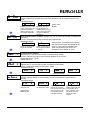
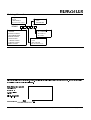
Display Colour Change
Function: Defines the colour of the display for prior to and after the preset value is
reached
Adjustment Range:
*!=
Red: The display will
always be red
Default Value:
Green to red
2 735 061, Rev. 030798
#+!!C
Green: The display
will always be green
#C:+=
Green to Red: The
display will be green
prior to the preset value
being reached. It will
turn red after Preset
has been reached
Operating Instructions tico 735 - Elapsed Timer
+=:#C
Red to Green: The
display will be red prior
to the Preset value
being reached. It will
turn green after the
Preset has been
reached
page 9/12