1
AQUASENSATION AS2000T / AS2000
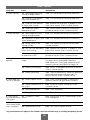
CLEANING THE FILTERS
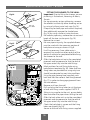
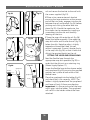
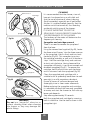
Fig.53
Upper filter shown
NOTE: Isolate the electricity and both hot
and cold water supplies to the unit before
proceeding further.
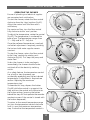
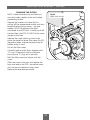
Remove the shower unit cover by first
pulling off the temperature control and then
remove the two fixing screws – top and
bottom. NOTE: Be aware of the lead
connected to the PCB unit. Carefully pull off
the lead from the PCB. DO NOT let the cover
dangle by the lead.
Filter
Filter cover
Filter
Remove the single retaining screw from
either the upper or lower filter cover (fig.53),
depending upon whether top/rear entry or
bottom entry is used.
Retaining screw
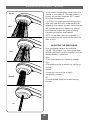
Pull off the filter cover.
Carefully hook out the filters together with
‘O’ rings. Thoroughly clean and replace
ensuring the ‘O’ rings are in position.
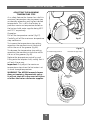
Refit the filter cover and secure with the
screw.
Offer the cover to the unit and replace the
four wire lead to the PCB. Secure the cover
with the top and bottom fixing screws.
Replace the temperature control.
21