1
Optional Extra - Connecting an iPod or iPhone
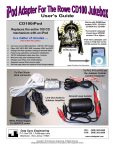
When using the optional iPod / iPhone accessory pack both the Jukebox
music and iPod music is routed through a pair of external speakers.
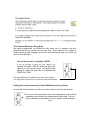
Dock your own iPod / iPhone into the Audio Mixer as shown below and
simply play the playlist or song from your iPod / iPhone and as normal.
To select the iPod / iPhone music instead of the jukebox music (and
indeed vice-versa) move the two audio mixer sliders up or down, setting
the volume to the desired level on one slider and the other slider to off.
Notes for iPhone5
We leave a small adaptor with the
mixer so you can connect your
iPhone5 into the 30 Pin Connector
Notes for Laptop, Android, Tablet
When requested, we will leave a
white audio lead connected into the
mixer that can connect directly into
your devices headphone socket.
The “Line 2” Input switch on CH2
must be selected to play the device.
Then use the “iPod” volume control
slider to set desired volume
iPod Dock
2 x External Speakers
Juke Vol
iPod Vol
Diagram Not to Scale