1
Table of Contents
1.0 cfa1000x Features & Benefits
1.1
cfa1000x System
2.0 System Installation
2.1
2.2
2.3
Unit Installation
Unit Wiring
Encoder Setup
3.0 Functional Overview
3.1
3.2
3.3
3.4
3.5
3.6
The Force Sensor
The Encoder
The CPU
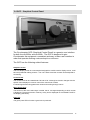
GCP – Graphical Control Panel
3.4.1
Selection Menus
3.4.2
Adjusting the Display Contrast
3.4.3
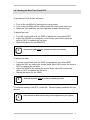
Setting the Real Time Clock RTC
3.4.4
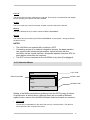
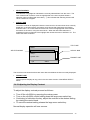
The Production Screen
Digital I/O
Coaxial Interface
4.0 Analysis Algorithm
4.1
4.2
4.3
4.4
4.5
Evaluation Range
4.1.1
Setting Width Factors (W1 & W2)
Production Process Limits
4.2.1
Setting BLO – Bad Limit Overall
4.2.2
Setting S Factor – Stop Factor
4.2.3
Setting D Factor – Drift Factor
Adjusting Zone Sensitivities
4.3.1
Setting S1 & S2 Sensitivity Factors
The Teach Sequence
4.4.1
Setting T Factor – Teach Factor
4.4.2
Setting the number of Teach Cycles
4.4.3
Starting a new Teach Sequence
Drift Compensation
4.5.1
Controlling Drift Compensation
5.0 Force Calibration
5.1
Peak force calibration of the cfa1000x
6.0 The Batch Buffer and Online Statistics
6.1
Viewing Batch Statistics
7.0 The Batch Counter Facility
7.1
Setting the Batch Counter
8.0 Auxiliary Inputs and the Relays
8.1
8.2
8.3
Relay Mode Quick Set
Quick Set Modes
Relay Programming Matrix
8.3.1
cfa1000x Events
8.3.2
cfa1000x Relay Actions
8.3.3
Linking Events with Actions
8.3.4
Setting a Relay Action
8.3.5
Relay Strobe Timings
9.0 The Password Facility
9.1
9.2
9.3
9.4
Setting the system password
Locking Menus
Unlocking Menus
Password Utility
10.0 Press cycle counter facility
10.1 Viewing the press cycle counters
10.2 Reseting the resettable press counter
11.0 Additional features and settings
11.1 Restoring Factory Default Settings
11.2 Seting the coaxial interface node address
11.3 Cfa1000x Data Cature Triggering
11.3.1
Setting the data capture mode
11.4 Controlling buzzer operation
12.0 cfaNET PC Software
12.1 cfaNET Software Installation
12.2 cfaNET Hardware Installation
12.2.1 Network Adapter Connection
12.2.2 Connection of cfa1000x to the cfaNET
12.2.3 Configuring the network NODE ID
12.2.4 Troubleshooting the cfa network
12.3 Use of cfaNET software
12.3.1 Serial Port Settings
12.3.2 Adding/Deleting a press station
12.3.3 Setting Press Station Properties
12.3.4 Downloading a force curve
12.3.5 Downloading the batch buffer
12.3.6 Resetting the batch buffer
12.3.7 Add to statistics window
12.3.8 Adding a user defined background
13.0 Printing a batch report using the optional printer
13.1 Printing – Troubleshooting
APPENDICES
5
7
10
10
13
15
16
16
17
17
18
19
20
21
22
23
23
25
27
27
27
28
28
29
29
29
30
31
31
31
32
33
34
36
37
38
39
39
40
41
41
45
45
45
45
46
46
47
47
47
47
48
48
48
49
50
50
50
50
51
51
52
52
53
53
54
55
55
56
56
56
57
57
58
58
59
59
60
60
4