1
4.2.3 Setting D Factor – Drift Factor
To Set the D Factor :1.
2.
3.
4.
5.
From the MAIN menu select SETUP and press ENTER.
Select LIMITS and press ENTER.
Select D FACTOR and press ENTER.
Set the factor value and press ENTER to save the value, or ESC to quit.
Press and hold ESC to return to the PRODUCTION screen.
i
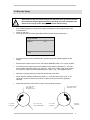
The DRIFT STOP LIMIT BLO x D Factor sets the tolerance at which the
machine should be stopped due to excessive process drift. The PROD
STOP relay event is generated.
4.3 Adjusting Zone Sensitivities
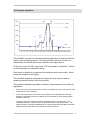
The user has two sensitivity factors which allow the sensitivity of the analyser
in zones 1 and 2 to be increased or reduced.
This feature is useful if one zone is particularly noisy or if one part of the crimp
force profile is of more interest than the others in a particular application.
The sensitivity is adjusted by setting the values of parameters S1 and S2 the
Z1 and Z2 sensitivity factors.
Increasing the sensitivity factor, increases the sensitivity of the analysis in that
particular zone.
Reducing the sensitivity factors reduce the sensitivity in that zone.
4.3.1 Setting S1, S2 & S3 Sensitivity Factors
To Set the S1, S2 and S3 Factors:1.
2.
3.
4.
5.
6.
From the MAIN menu select SETUP and press ENTER.
Select ANALYSIS and press ENTER.
Select ZONE PARAMETERS and press ENTER.
Select SENSITIV. S1, SENSITIV. S2 or SENSITIV. S3 and press ENTER.
Set the factor value and press ENTER to save the value, or ESC to quit.
Press and hold ESC to return to the PRODUCTION screen.
i
It is not normally necessary to edit these parameters. They are
provided for additional control and flexibility. It is recommended that
the CFA1000x be left to set these parameters automatically.
29