1
x
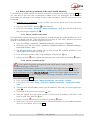
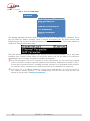
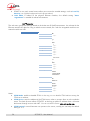
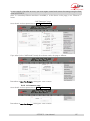
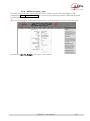
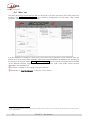
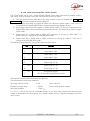
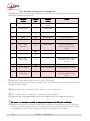
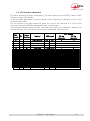
SIP Registration: enable or disable the registration on a SIP registrar server. The following
menus SIP xxx are used to enter the parameters of the account on this server, when using such
service. These parameters should be provided by the administrator of the SIP server. The SIP User field usually corresponds to a number that a remote party can call to initiate a link with
the codec when it is registered on the server.
With this SIP Registration sub-menu, you can disable the registration and hence stop using a
SIP server, without having to erase account parameters; they stay ready for later use.
x
SIP Outbound Proxy: IP address or domain name of a proxy server through which SIP
transactions and audio streams are relayed. This parameter is optional, to be filled only is
such server is used in the organization.
Note : contrary to the SIP registration data, this parameter is active even if « SIP Registration »
is disabled.
x
Keepalive Interval: sets the interval between two re-registrations on the SIP server. This
setting can be used to make the registration renewal more frequent, but the server always
imposes a maximal period; for this reason the dHIDXOWVHWWLQJ´Server PresetµLV
recommended except for specific cases.
x
SIP port: the default port for SIP signalling is 5060 (UDP), you can enter a different value
here.
Note: this port number is valid for the SCOOP 5 itself, not the server. For the server side, if a
non-VWDQGDUGSRUWLVXVHGHJWKH´SIP RegistrarµILHOGPXVWVSHFLI\WKHSRUWDIWHUD
FRORQOLNHLQ´P\6,3VHUYHUµ
x
RTP Port: the default port for RTP/SIP audio streams is 5004 (UDP), but you can enter a
custom value here if desired.
x
RTP TOS: if the transmission network supports DiffServ to manage the media priority, you
can set here the type of service which is assigned to the stream transmitted by the codec.
You should enter here a decimal value, HJ IRU WKH PD[LPDO SULRULW\ FRGH ´([SHGLWH
)RUZDUGLQJµ7KHGHIDXOWYDOXHLV´%HVW(IIRUWµ.
x
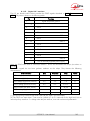
Packet Replication: (see also 2.1.1 and page 8 regarding this feature) you can select here
the setting for packet replication:
0 => standard mode without replication (default setting)
1 => packet replication without interleaving
2 => packet replication with interleaving: the second packet is delayed; robustness is
improved but latency is increased.
x
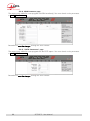
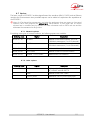
Transmission Mode: select here between SIP (unicast) or using multicast (see also above in
2.1.1, IP multicast). The following sub-menus exclusively apply to the multicast mode. Besides,
the SIP settings are not relevant for this multicast transmission mode.
x
Multicast Mode: if the selected mode is Multicast, the transmission is unidirectional. Select
with this menu if the codec must be sender of a multicast stream, or rather receiver of such
stream.
x
Multicast Control Port: this port number (UDP) is used for sending control packets
accompanying the multicast stream. Default value is 6000.
x
Multicast Audio Port: this port number (UDP) is used for transporting the multicast audio
stream. Default value is 6001.
Note: this setting is not related to the RTP Port setting valid for RTP/SIP.
Multicast TTL: TTL value applicable to the RTP multicast audio stream. Default: 254.
x
SCOOP 5 - User Manual
51