1
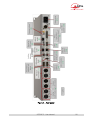
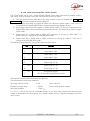
Drawer for SIM card [6]
In the units fitted with the mobile network access option, this drawer houses the SIM card enabling the
access to the network and services.
L The SIM card must be inserted while the unit is off (or in standby).
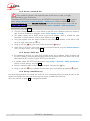
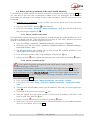
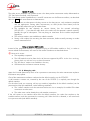
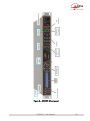
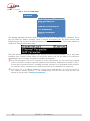
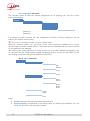
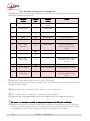
To remove the drawer and the card, push the small button shown by the little arrow besides the
drawer (see picture below).
Main
antenna
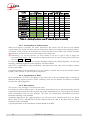
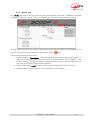
Figure 5 ² Rear panel, SIM card
To set the SIM card in place, first insert it in the cavity inside the drawer. Make sure to have the cut
corner on the right place, with the SIM chip visible. Then insert the whole assembly into the slot, with
the SIM card chip facing down. Check that the drawer is well in its guides before pushing it completely
in place.
L If you have to use a smaller format µSIM card, you can use a SIM/µSIM adapter (available on
request from AETA): first set the µSIM inside this adapter, afterwards use this assembly like a
regular SIM card.
Antenna sockets [8]
On the products fitted with the mobile network access option, these SMA sockets allow to connect one
or two antennas (a multiband antenna is included with the mobile network option).
At least one antenna must be plugged on the main socket, the one that is shown on the picture above
(the outmost socket, left side of the unit).
A second antenna is optional, but it allows to improve the reception quality in less favourable areas; it
must be activated (configuration menus) if one is connected.
The antennas must cover the band(s) used for the operator and network services. Refer to the operator
in doubt. The provided antenna covers the 900 MHz, 1800 MHz, 1900 MHz, 2100 MHz bands. It is
compatible with almost all the 2G and 3G/3G+ networks in Europe.
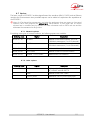
USB socket [3]
This ´KRVWµ socket allows the connection of a peripheral device, e.g. a mobile access USB module or
´NH\µLQRUGHUWRDFFHVVPRELOH,3WUDQVPLVVLRQ
Refer to chapter 2.1.5 about this function.
As another use, an Ethernet adapter can be plugged for providing a secondary Ethernet/IP remote
control interface; see chapter 2.5.4 for this topic.
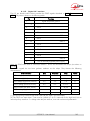
Remote control serial port (Remote) [12]
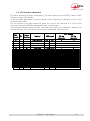
This 9-pin female sub-D socket is an asynchronous serial interface port, usable for remote controlling
the equipment thanks to a control and supervision PC.
For this capability refer to 2.5.3 Remote control via a serial port or TCP/IP.
SCOOP 5 - User Manual
31