1
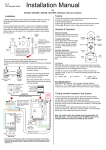
Operating Instructions for 605A & 605AK wireless Video Intercom
Operation
Gate / Door release button
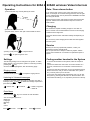
1) When handset rings, visually identify the visitor.
If you wish to open a gate or door, even when there is no one
there, for example, for a vehicle leaving premises, then the gate
or door release button can be pressed for 3 seconds to activate
the door/gate release.
40-80c
m
Please use this function with extreme caution with electric gate
systems. Please ensure this handset is kept out of reach of
small children.
Charging
2) Press OK to answer the call.
3) Speak clearly into the TOP part of the handset as shown.
The handset is capable of holding charge for more than 24
hours, however it is recommended that it is left on the charging
cradle at least for night time.
Using the vibrate function will shorten battery life depending on
usage.
10cm
Do not use any other charging device other than that supplied
with the system.
Service
4) During a call, press
5) Press
to adjust volume.
to open the gate or door.
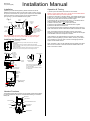
Coding another handset to the System
Settings
The following settings can be changed in the system. To make
these changes, you must put the system in monitoring mode by
pressing the
key.
Once the video image appears, then the following apply...
Ringing volume
In monitor mode, press
to adjust the ringing volume.
Listening to Voicemail messages
To listen to voicemail, press OK to play. If there are more than 1
message, press
and
to select the message required and
press OK to play.
= Pause / Exit
= Continue
= Delete, long press
= delete all.
Enter Menu
Press and hold
key for 3 seconds to enter the Menu.
You can navigate options for…
Brightness
Language
Message
Bell
Colour
Press
to scroll
Should you have any operational problems, contact your
professional security installer firstly.
Do not open the unit or attempt to make any repairs. Please
contact the manufacturer or merchant for replacement parts or
spares.
Press
to exit
Press OK to select
To add an extra handset to the system, follow the sequence
below..
1) Press and HOLD the code button on the door station for 3
seconds, until the LED’s on the bottom of the board start to
flash.
2) Press and hold the Code button on the new handset ignoring
the first short tone, until you hear a confirmation tone (“Di-DoDo”). This may take up to 10 seconds.
3) Once the door station lights stop flashing, then you can test
the system by pressing the call button on the door station. The
new handset should ring. If not, repeat the process from the top.