1
Fitting the detector
Protect the electronics against water. Trapped moisture can
affect or damage the unit.
Packaging
The package contains:
•
•
•
•
•
•
•
•
1x wireless detector
3x wall plug & screw sets
1x lens mask
1x tamper cup
2x tamper caps (different lengths)
1x plastic opening tool
1x installation manual
1x drilling template for fixing holes
Mounting holes should be sealed from within the detector using
acrylic (non-silicone based) sealants. Silicone sealants must
not be used as vapours may corrode the electronics and
metal parts.
Ensure the detector's field of view is unobstructed.
Mounting the detector:
1.
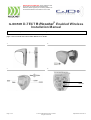
Drill the wall to accept the fixing screws and the tamper
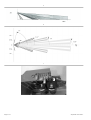
cup (if used). See Figures 1 and 3.
A hole-drilling template is provided.
Notes
GJD’s Ricochet® enabled D-TECT®
The wireless detector uses a quad pyro where both sensors
must trigger to cause the detector to signal an alarm ensuring
precise and reliable presence detection.
•
Use the tamper cup on uneven surfaces.
•
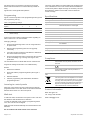
The optimum mounting height is 3m. Higher mounting
heights will result in reduced detection range and the
target will have to move a greater distance within the
field of view before an alarm is generated.
Programmable options include a variable pulse count and a
choice of detection ranges up to 50 meters.
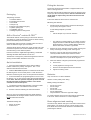
The dual-axis tilt sensor allows 180° of pan and 90°of tilt. This
increases the speed of the outdoor installation and provides
accurate aiming of the detection pattern.
Precision electronics, digital white light filtering, and double
shielding eliminates false alarms from the sun.
2.
Remove the cover assembly using the plastic opening tool
and by loosening the locking screw. See Figure 2.
3.
Screw the unit to the wall. Ensure the tamper pin is
correctly located and the tamper switch is closed.
Two different length tamper feet are provided for uneven
surfaces. The tamper foot is a push-fit see Figure 1.
The detector housing has a professional appearance with the
sensing module hidden behind the front cover.
4.
When the detector is aligned, powered and programmed:
Quick installation
a.
Fit the cover.
1. Place two CR123 batteries into the detector battery
holders. Observe the polarity. See figure 4, item 1. The
detection LED will flash four times.
b.
Loosely tighten the locking screw.
c.
Push the two side plastic latches into the base.
d.
Tighten the locking screw.
2. With the Ricochet® expander in commission mode enter
the learning menu on the control panel. To learn the device
follow the instruction given in the control panel documentation.
Batteries
3. Press and release the programming button once to learn
the device. ( Fig 10, item 2).This action also activates walk test
mode. Note: The learn process may take up to 10 seconds
from pressing the programming button. Learn will be
confirmed on the control panel.
Only use CR123 3 V Lithium batteries.
4. The detector will take approximately 3 minutes to settle.
The detection LED is now enabled for five minutes.
•
•
•
•
•
•
5.
Mount the detector following the instructions below.
Observe correct polarity when fitting.
Battery safety information
Do not put in a fire
Do not charge
Do not heat
Do not short circuit
Do not disassemble
Only fit batteries of the same type and voltage
Note: To carry out a walk test the zone mode must be
programmed to be ‘Always Awake’ and the front cover
must be fitted and secured.
To preserve battery life the zone mode must be programmed
to be “Auto” which introduces a 3 minute sleeptime.
The default settings are:
Beam alignment and masking
•
•
3/4
Range: 50 meters
Pulse count: 1
The PIR circuitry detects changes in heat and movement in the
beam pattern. The presence of trees, shrubs, ponds, boiler
flues, black tarmac and animals should be considered when
positioning the detector.
September 2013 Rev 4