1
Sonavision Ltd.
Aberdeen, Scotland
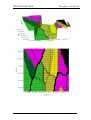
• The above route is the effect of clicking the REV button for the original
route shown in this section.
• Once all waypoints have been toggled through, the route will be switched
OFF and the ROUTE BAR will display that the route has finished.
TEXT
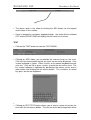
• Click on the TEXT button to show the TEXT MENU
• Clicking on ADD allows you to position the mouse cursor on the chart.
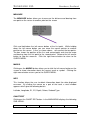
Click the left mouse button where you want the text to be displayed. A on
screen keyboard is shown. Either use this or the normal keyboard to enter
your text. Click on OK or press <enter> to write the text to the chart. The
on screen keyboard is operated by positioning the mouse cursor over a
letter button and clicking the left mouse button. This simulates an actual
key press on the real keyboard.
•
• Clicking on EDIT TEXT button allows you to chose a piece of text on the
chart with the left mouse button. The text can when be changed with either
Issue 5
5249-32-0001
Page 21 of 42