1
BUILT-IN LIGHT SHOW (SOUND ACTIVE) OR DMX-512 (USITT),HIGH OUTPUT,VERY LOW POWER CONSUMPTIONCONNECT MORE UNITS IN A SINGLE CIRCUIT,EXTREME LONG LIFETIME OF THE LEDS (100,000 HR.
RATING),LINKABLE VIA 3-PIN XLR DMX IN/OUTPUT,7 DMX CHANNELS,LED DMX DISPLAY WITH 4-BUTTON MENU,
RICH, SATURATED COLORS THAT WILL NOT FADE, RUNS EXTREMELY COOL - NO DUTY CYCLES - RUN ALL
NIGHT. LASER SIMULATED AERIAL EFFECTS
Installation
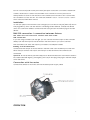
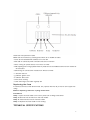
On the rear panel of the LED DMX color changer you can find an XLR-jack (DMX Out) and an
XLR-plug (DMX In), which can be used for connecting several devices. Choose the device
which is to control the effects. Connect the DMX OUT-jack with the DMX IN-plug of the next
device.
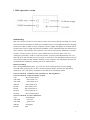
DMX-512 connection / connection betw een fixtures
The w ires m ust not com e into contact w ith each other.
XLR-connection:
If you are using controllers with this light, you can connect the DMX-output of the controller
directly with the DMX-input of the first fixture in the DMX-chain. If you wish to connect
DMX-controllers with other XLR-outputs, you need to use adapter-cables.
Building a serial DMX-chain:
Connect the DMX-output of the first fixture in the DMX-chain with the DMX-input of the next
fixture. Always connect one output with the input of the next fixture until all fixtures are
connected.
O p tional: At the last fixture, the DMX-cable has to be terminated with a terminator. Solder a
120 resistor between Signal (–) and Signal (+) into a 3-pin XLR-plug and plug it in the DMX-output
of the last fixture.
Connection w ith the m ains
Connect the device to the mains with the enclosed power supply cable.
OPERATION
3