1
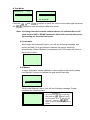
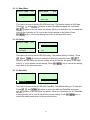
3.1.3.4 Stop Bit(s):
Serial Comm. 4/5
Parity
Stop Bit(s)
1/3
> 1
Data Bits
2
> Stop Bit(s)
Exit
This option is used to set the RS-232 Stop Bits. The default setting is “1” stop bit.
Press
and
buttons to select the different Stop Bits and press
button to set the value into printer. When you enter this list, the option in
the right side of ">" icon is the printer current setting. Press
key to
cancel the setting and return to the previous menu.
46