1
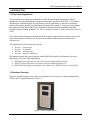
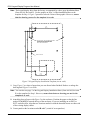
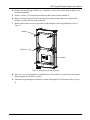
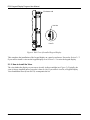
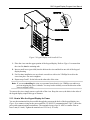
ROC Keypad Display Program User Manual 2 INSTALLATION This section provides instructions for installing the physical ROC Keypad Display and for installing and configuring the ROC Keypad Display program. You must install the keypad display before you install and configure the program. Read Section 1.3 of this manual for program requirements. 2.1 Installing the Keypad Display Note: The keypad display is designed for panel or enclosure mounting. The keypad display enables you to access ROC800 process and operational information and view and change ROC800 parameters. When powered, the keypad display shows ROC800 values in real time. Using the 25 multi-function keys, you can browse through lists and screens, type text, and enter numeric value. Any changes you make using the keypad display take immediate effect in the ROC800. See Table 4 in Section 4.1 for a list of actions for each keypad display button. The ROC800 uses any EIA-232 (RS-232) port to communicate with the keypad display. The keypad display requires 10 to 30 Volts dc and can be powered either by the ROC800’s power module or an external power source. You need the following tools to install, remove, or wire a keypad display: Phillips screwdriver, size 2. Flat blade screwdriver, size 2.5 mm (0.10 inch). Electric screwdriver, tip size 2 (can be portable battery-driven style). Drill with 5.5 mm (0.219) inch drill bit. 1¼ inch knockout punch. Wrench to accommodate #8 hex nuts. The keypad display itself requires no configuration. Any configuration occurs at the program level using ROCLINK 800 software. Refer to Section 2.2 for software configuration instructions. 2.1.1 How to Mount the Keypad Display Review the following guidelines for mounting the keypad display: Enclosure Mounting Panel Mounting If you intend to panel-mount the keypad display, you can remove the gasket attached to the back of the keypad display. If the panel has not been pre-cut, follow steps 1 through 9. If the panel has been pre-cut, follow steps 7 through 9. If you intend to mount the keypad display in a ROC800-Series enclosure (Models EN23 or EN37 or other Type 4 enclosure), you must use the gasket attached to the back of the keypad display Review steps 1 through 6 to appropriately prepare the enclosure before mounting the keypad display. Revised Jun-07 3