1
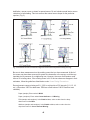
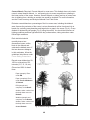
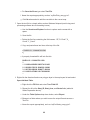
Paper (sample and complete): Enter under HT DBH.
PDA (sample and complete): In the Stems window, a value of 4.5 ft (1.4 m) is
generated automatically. Correct if necessary.
Webform (sample and complete): In the Stems window, a value of 4.5 ft (1.4 m) is
generated automatically. Correct if necessary.
DBH measured: PDA and webform only. Whenever possible DBH should actually be
measured, but if necessary it can be estimated visually.
Paper (sample and complete): NA
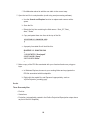
PDA (sample and complete): In the Stems window, if direct measurements were
made, check the box next to DBH Measured.
Webform (sample and complete): In the Stems window, if direct measurements
were made, check the box next to DBH Measured. Once all information has been
entered for a given stem, click OK to continue. When all stems have been entered,
click the left arrow on the main Stems page to return to that tree’s main menu.
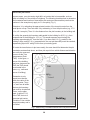
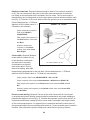
Direction to building: If you decided to collect information related to energy effects during
Phase I: Getting Started: Early Decisions, this field is required. For trees (≥20 ft. tall) that
are located within 60 ft. of space-conditioned residential buildings that are three stories or
fewer in height (two stories and an attic), record the direction (azimuth in degrees) from
the tree to the closest part of the building. For multi-family dwellings, treat all the units in
the building as a single building. The building does not have to be located on the plot.
The energy analyses are currently set to run for typical building types and climate zones
of the United States. Eco v 5.0 also will allow Australia and Canadian projects to produce
energy effects using an adaptation of the United States model. Up to three buildings can
be recorded using the paper forms, PDA or mobile device. Standing dead trees that meet
the above conditions should be included.
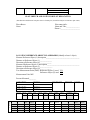
Paper (sample): Enter the direction to the three closest buildings under TREES
NEAR BUILDINGS > D1/D2/D3.
Paper (complete): Enter the direction to the three closest buildings under Tree/
Building Energy Interactions (Dir. & Dist) > D1/D2/D3.
PDA (sample and complete): Building-related fields are accessed under the Bldg
tab. Click Add to add the first building. The Bldg ID will be filled in automatically.
Enter a value under Direction.
Webform (sample and complete): Building-related fields are accessed under the
Building Interactions tab. Click the plus sign in the top right to add the first
building. The Bldg ID will be filled in automatically. Enter a value under Direction.
Shortest distance to building: If you collected data on direction to building, this field is
also required. For buildings recorded above, measure the shortest distance from the tree
to the closest part of the building (in m or ft). Standing dead trees that meet the above
conditions should be included.
52