1
User Manual: PS020A
User Manual: PS020A
DMX-controlled 3-CHANNEL Power Supply
Maintenance (Boot loader)
The Maintenance (boot loader) function enables the unit to receive firmware updates
via the DMX connectors. For further information refer to the website www.multiformlighting.com and check “Download”.
Switch on condition
The unit always returns to the last mode before it was switched off. In DMX Slave “SLA”
or DMX Mode “d” or DMX Preset Mode “P” all DMX values are cleared (LED’s off) if
power is switched off.
DMX signal drop condition
The device will retain the status that it was in before the DMX signal got lost, but
potential strobe settings will be automatically cleared.
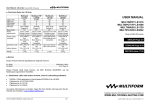
DMX channel assignment overview:
Mode >
DMX
CH1
CH2
CH3
CH4
A
C
P
(CH3<50)
P
(CH3>50)
d
SLA
Red
Green
Blue
0
Red
Green
Blue
0
Colour
Dimmer
0-49
Strobe
Pattern
Dimmer
Speed
Strobe
Red
Green
Blue
Dimmer/Strobe
Red
Green
Blue
0
■ Maintenance
This unit does not need regular maintenance. The internal circuit is protected by a
250V/2A slow-blow fuse 5x20mm fuse. If this fuse fails, this usually indicates an
internal fault requiring servicing by a qualified engineer. The fuse shall only be replaced
by a fuse of same specification, and the replacement has to be made by qualified
personnel obeying applicable safety rules.
V1.00 (06-2007) © Multiform, Leigh-on-Sea, UK
14
DMX-controlled 3-CHANNEL Power Supply
General advice:
1. Read this manual completely before using the product.
2. Keep this manual in your records for future reference.
3. Follow all instruction printed in this manual, otherwise warranty
may be void.
4. Follow all printed security advice on the product itself. The lighting
flash with arrowhead within an equilateral triangle makes you
aware of non-insulated AC mains voltage inside the unit. The
exclamation mark within an equilateral triangle makes you aware of
important operating and maintenance instructions in the literature
attached to this product.
5. Take care of enough distance between this product and sources of
hum and noise like electric motors and transformers.
6. Carry this product with greatest care. Punches, big forces and
heavy vibration may damage this product mechanically.
7. The manufacturer takes no responsibility for injury or damage
caused by not following the safety precautions and instructions
printed in this manual.
Protection from electric shock:
1. Do not connect the AC power plug to the unit before assembly has
been completed.
2. Only connect this unit to a mains socket outlet with protective earth
connection, ground-fault (earth-fault) protection and overload
protection.
3. Where the mains plug or an appliance coupler is used as a disconnect device, the disconnect device shall remain readily
operable.
4. To pull the AC Cord out of the wall outlet or the unit’s AC socket,
never pull the cable itself, but only the AC plug.
5. Disconnect the unit from AC supply by pulling the AC plug out of
the wall outlet or the unit’s AC socket before any kind of cleaning
on the product. Use smooth and dry cloth only for cleaning. Check
all connection cables before reconnecting the unit.
6. Do not expose this unit to any dripping or splashing liquids, and do
not place objects filled with liquids, such as vases, on the unit. Do
not operate this unit near to open water or in high humidity.
7. Choose the position of the AC cord according to the lowest risk of
damage by foot steps or by squeezing it. Take especially care of
the AC cord outlet on the unit as well as the AC plug and wall outlet
at the other end of the cable.
8. Do not open the unit for service purpose, as there are no userserviceable parts inside. Warranty will be void in any case of
unauthorized service by the user or other not authorized persons.
V1.00 (06-2007) © Multiform, Leigh-on-Sea, UK
3