Download OPERATING INSTRUCTIONS - talknet
Transcript
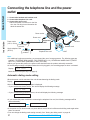
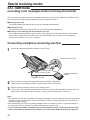
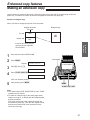
Special receiving modes EXT.TAM mode (recording voice messages and/or receiving documents) This unit can be connected to an external telephone answering machine (TAM). When the EXT.TAM mode is set, the facsimile unit and telephone answering machine will work as follows. » Receiving voice calls The telephone answering machine will record voice messages automatically. » Receiving fax calls The facsimile unit will activate the fax function to receive documents automatically. » Receiving a voice message and fax document in one call The telephone answering machine will record the voice message first. Then the facsimile unit will activate by the caller’s request and receive documents. For further details, see “Leaving a voice message and sending fax documents to your unit” on page 24. Connecting a telephone answering machine 1 Connect the telephone answering machine to the EXT jack. Connect to the EXT jack. LIN E EX T Peel off the tape on the EXT jack. Telephone answering machine Telephone line cord 2 3 Set the number of rings on the telephone answering machine to less than 4. ¡This will give the answering machine an opportunity to answer the line first. Record a greeting message referring to the example below. “This is (your name, business and/or telephone number). We are unable to answer the phone right now. Please leave a message after the long beep. To send a fax, start transmission. Thank you.” Note: ¡Do not pause for more than 4 seconds in the greeting message. If a 4-second pause is stored in the greeting message, all incoming calls will be routed to the facsimile unit from the answering machine even while the greeting message is playing. ¡We recommend you to keep your greeting message around 10 seconds in length. If a greeting message is too long, some incoming fax calls may not be answered by the facsimile unit. ¡If your answering machine is equipped with a remote operation feature, set the same remote access code on the answering machine to the facsimile unit as the remote TAM activation ID (see page 24). 22