Download OPERATING INSTRUCTIONS - talknet

Transcript
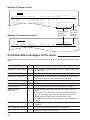
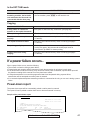
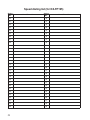
Sample of journal report
JOURNAL
NO.
01
02
03
04
05
OTHER FACSIMILE
1234567
9998765
2121444
555556677
+987 1234
START TIME
Jan. 21 02:14PM
Jan. 21 02:17PM
Jan. 21 02:18PM
Jan. 22 10:35AM
Jan. 22 11:02AM
USAGE TIME MODE
00'25
TX
00'38
TX
00'28
RX
00'58
TX
01'50
TX
RX
Jan. 25 1997 05:22PM
PAGES RESULT
01
OK
02
OK
01
OK
03
COMMUNICATION ERROR
05
OK
03
OK
Communication
messages
(See below.)
Sample of transmission report
UCODE
(43)
Error code
(for service
personnel
use only)
XMT REPORT
NO. OTHER FACSIMILE
01 COMPANY ABC
START TIME
Jan. 20 01:18PM
USAGE TIME MODE
00'51
TX
Jan. 20 1997 01:19PM
PAGES RESULT
00
COMMUNICATION ERROR
UCODE
(43)
Communication messages on the report
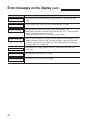
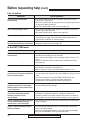
When a problem has occurred, one of the following messages will be printed on the transmission and journal
reports.
PRINTED MESSAGE
COMMUNICATION ERROR
CODE
MEANING
41–72
FF
¡A transmission or reception error occurred. Try again or check with
the other party.
DOCUMENT JAMMED
—
¡A document is jammed. Remove the jammed document (p. 66).
ERROR-NOT YOUR UNIT
—
¡A transmission or reception error occurred because of the trouble
of the other party’s machine. Check with the other party.
JUNKMAIL PROH. REJECT
—
¡The junk mail prohibitor of your unit rejected fax reception.
MEMORY FULL
—
¡The document was not received due to memory being full.
NO DOCUMENT
—
¡The document was not fed into the unit properly. Try again.
OTHER FAX NOT
RESPOND
—
¡The receiving unit was busy or ran out of recording paper. Try
again.
¡The START/COPY/SET button was pressed when the document
was not set properly. Set the document properly and press the
START/COPY/SET button after confirming the fax tone.
¡The other party’s machine is not a facsimile. Check with the other
party.
PRESSED THE STOP KEY
—
¡The STOP button was pressed and fax communication was
canceled.
THE COVER WAS OPENED
—
¡The front cover was opened during fax transmission.
OK
—
¡Fax communication was successful.
58