1
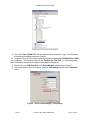
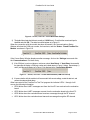
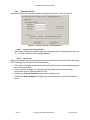
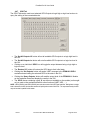
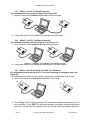
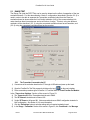
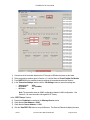
FreeStar Pro Kit User Guide Figure 13 – Screen, Test Tool – PERT Test 4.4.2.1 Data: The message to be sent (thirteen 1-byte fields). Source Address: The ‘Transceiver ID’ of the evaluation board being used as the transmitter. Dest Address: The ‘Transceiver ID’ of the evaluation board being used as the receiver # Packets: The number of times the packet will be transmitted. Message Source: Defines the message in the data fields, as follows: o o PERT Setup Section Predefined: Fills the Data fields with predefined numbers (1 ~ 13). User Defined: Allows the user to change any of the data values (0 ~255) in the 13 ‘Data’ fields. Start PERT RX: Sets the receiver into a mode ready to receive packets (if the module connected to this version of the GUI is configured as the receiver); if using a User Defined Message Source, copies the data fields from the ‘Transmitter’ area. Start PERT TX: Starts the transmission of the specified number of packets (if the module connected to this version of the GUI is configured as the transmitter). 4.4.2.2 PERT Results Section Data: The criteria message for the error rate test (must match the transmitter data). The next four fields are filled by the test program when it is run. On starting the PERT, Packets Expected will immediately display: Packets Sent: Total number of packets sent. Packets Received: Successfully received packets (data received matched the criteria). % Success: Equal to ‘Packets Received’/’Packets Sent’. Packets Expected: Equals the ‘# Packets’ from the Transmitter. Rev B Document No. 0006-00-08-00-000 Page 21 of 42