1
Colon Commands
Commands That Tailor the Editing Environment
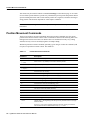
Several colon commands can be used to create keyboard shortcuts. The :set command can be used
to manipulate the vi editor parameters described in the table on page 10.‘‘ These commands are as
follows:
Table 3-11
Commands That Tailor the Editing Environment
Command
Description
map key string
Assign user-definable strings to particular characters. If key is typed in command
mode, vi behaves as if string had been typed instead (but see below for map!).
If key is typed in insert mode, vi behaves as if string had been typed instead.
map! key string
The same key can be used twice, once for insert mode and once for command mode.
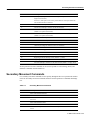
unmap key
Remove any mapping established for key in command mode.
unmap! key
Remove any mapping established for key in insert mode.
set flag
Set flag to TRUE.
set noflag
Set flag to FALSE.
set var=value
Set var to the numeric value value.
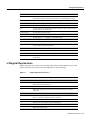
The following vi editor parameters may be manipulated by :set commands.
Table 3-12
Editor Parameters That May be Set With the set Command
Parameter
Description
autoindent
If set, when text is added vi indents each new line by the same amount as the previous
line.
autowrite
If set, vi writes the file to disk automatically when it switches between files or when it
is stopped with ^Z.
ignorecase
If set, search commands ignore case.
list
If set, tabs in the file are made visible on the screen as ^I.
magic
If not set (set nomagic), special characters described on page need not be quoted
with a backslash.
tabstop
Width in spaces of a tab stop; used also for shifting text.
wrapscan
If set, searches wrap around from one end of the file to the other.
Vi Editor User’s Guide 3-11