1
vi Regular Expressions
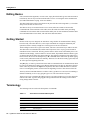
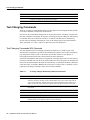
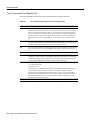
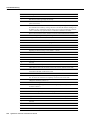
Term
Definition
word
An unbroken string of (1) letters, digits, and underscores (“_”), or (2) characters
other than letters, digits, underscores, and white space, depending upon context.
big word
An unbroken string of characters other than white space.
unnamed buffer
A buffer containing the last text yanked or deleted.
window
The part of the file that is visible on the terminal.
line
A string of characters followed by a newline character. A “line” of text may take
up more than one row on the screen.
current character
The character beneath the cursor.
current line
The line containing the cursor.
^x
Control character x, e.g. ^B means control-B (ASCII 2).
return
^M or the [Return] key.
command mode
The normal operating mode of the editor. Each key typed is taken as a command.
insert mode
The mode used for manually adding text to a file. Characters that are typed while
in insert mode are inserted into the text.
replace mode
Like insert mode, except that characters typed replace characters in the buffer.
char
Any ASCII character.
named buffer
One of 26 buffers with names “a” through “z”.
mark name
A lowercase letter that names one of 26 marks that can be used to save a position in
the file buffer.
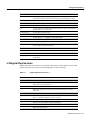
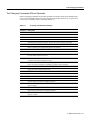
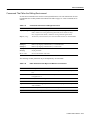
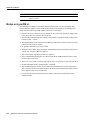
vi Regular Expressions
Regular expressions are usually used for searching. Most characters match themselves in a search
request, but the characters shown in the following table have special meanings:
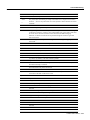
Table 3-2
Expression
Regular Expressions Used in vi
Definition
-
Matches any single character.
[chars]
Matches any char listed in the brackets. [x-y] is a range of characters, where the
ASCII value of x precedes that of y.
[^chars]
Matches any char not listed in the brackets.
^
Matches the beginning of a line when used as the first character in a regular
expression.
$
Matches the end of a line when used as the last character in a regular expression.
*
Matches zero or more instances of the preceding item, which may be a normal
char or a 1-character “wildcard” such as . or [chars].
+
Matches one or more instances of the preceding item.
?
Matches zero or one instances of the preceding item.
\<
Matches the beginning of a word
\>
Matches the end of a word.
Vi Editor User’s Guide 3-3