1
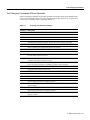
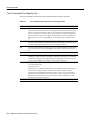
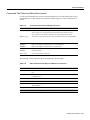
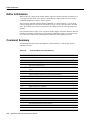
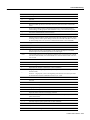
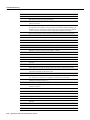
Command Summary
Command
Description
=
Not used.
>
Shift each line of the region right one tab stop.
?
Search backward. Prompts on the last line of the screen for a search pattern (default = last
pattern searched for).
@letter
Perform commands found in the buffer named letter as if they were typed on the keyboard.
Put commands into a buffer by creating a new line in the main file and then deleting it into
the buffer. Use the . command to repeat the effects of an invocation of buffered commands;
u and U commands only repeat the effects of individual commands in the buffer.
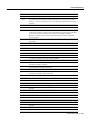
A
Move to the last character of the current line and enter insert mode after that character.
nB
Back to the beginning of the nth previous big word.
C
Change text in the current line (same as c$).
D
Delete remainder of the current line (same as d$).
nE
Forward to the end of the nth following big word.
Fchar
Previous instance of char on current line.
nG
The nth line of the file (default, last line).
nH
Beginning of nth line from top of text (default = 1, home).
I
Move to the first non-whitespace character of the current line and enter insert mode.
J
Join the next line with the current line.
K
Not used.
nL
Beginning of line nth row from bottom of text (default = 1).
M
Not used.
N
Search backward for last pattern searched for.
O
Add a blank line above the current line, move to the new line, and enter insert mode.
nP
Insert text from the unnamed buffer n times before the current position. Insert before the
current line if the buffer contains lines of text.
Q
Not used.
R
Enter replace mode, a variant of insert mode. Typing overwrites characters on the current
line. As soon as the current line is completely overwritten, enter insert mode.
S
Change the current line (same as cc).
Tchar
Character following previous instance of char on current line.
U
Multi-level undoing through the 9 most recent changes. (By contrast, repeating u has no
net effect on the file.)
V
Not used.
nW
Forward to the beginning of the nth following big word.
nX
Delete n characters to the left of current character.
Y
Copy remainder of the current line into the unnamed buffer (same as y$).
ZZ
Save the current file and leave vi.
[
Not used.
\
Not used.
]
Not used.
^
The first non-whitespace character on the current line.
3-14 LightStream 2020 NP O/S Reference Manual