1
Editing Basics
Editing Basics
If vi is started with no arguments, it creates a new, empty file which can be given a name and written
to disk at any time. It may be started with the name of a new or existing file on the command line.
(See Editor Initialization on page 10 for more details.)
The editor marks lines on the screen which are not part of the file with a single tilde (~). The editor
always forces at least one line to exist.
The editor is always in command mode or insert mode (with some variants of insert mode).
Command mode is the initial state of the editor, and is the mode from which nearly all editing
commands are issued. Insert mode is used to add or modify text. Several commands switch the editor
from command mode to insert mode, with side effects described below.
Getting Started
Because of the way vi is designed, one must know a large number of commands before editing
becomes really convenient. However, a few simple commands are enough for rudimentary file
operations, and are certainly enough for a careful typist to create new documents.
The first thing to learn is how to get to insert mode, since this is the normal way to add text to a file.
The editor starts in command mode, and the entire keyboard is “hot”: any key pressed results in
immediate action of some kind. The i key puts the editor in insert mode. Unfortunately, there is no
indication of this change, visual or otherwise. In insert mode, all printable characters that are typed
are inserted into the file before the current character. The return key terminates a line and moves to
the next line on the screen. The backspace key (^H, control-H) can be used to back up and fix typing
errors, but only within the current line. Similarly, ^W erases over the most recently typed word, and
^U erases up to the beginning of the line.
The [Esc] key, or control-[, returns from insert mode to command mode. In command mode, the h
key moves one character left, l moves one character right, k moves one line up, and j moves one line
down. (These keys form the line hjkl on the keyboard.) The editor sounds the bell if it is asked to
move to a meaningless position, such as before the beginning of a line or after the end of the file.
The x key deletes individual characters. To delete a line, type d twice in succession. If something is
deleted accidentally, recover it by typing u. Type i to re-enter insert mode at any time.
There are two ways to terminate the editing session. Type uppercase Z twice to save the current file
and leave the editor. Type the string :q! plus carriage return to abort the editing session without
saving changes made to the file.
Terminology
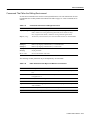
The following terms are used in the descriptions of commands:
Table 3-1
Terms Used in Command Descriptions
Term
Definition
text
Any series of ASCII characters.
buffer
A unit of memory used to hold text.
file buffer
The buffer that holds the file being edited.
white space
Tabs and spaces.
3-2 LightStream 2020 NP O/S Reference Manual