1
Chapter 13: VLAN Commands
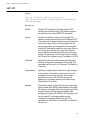
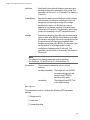
switch. For example, if you are creating a VLAN
called Sales that will span three switches, you should
assign the Sales VLAN on each switch the same VID
value.
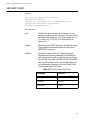
ports
Specifies the ports on the switch that are to be either
tagged or untagged members of the new VLAN. You
can specify the ports individually (e.g., 2,3,5), as a
range (e.g., 7-9), or both (e.g., 2,5,7-9). To specify all
ports on the switch, use ALL. This parameter must be
followed by the FRAME parameters.
frame
Specifies whether the ports of the VLAN are to be
tagged or untagged. This parameter must be used
with the PORTS parameter.
taggedports
Specifies the ports on the switch to serve as tagged
ports in the VLAN. You can specify the ports
individually (e.g., 2,3,5), as a range (e.g., 7-9), or both
(e.g., 2,5,7-9). To specify all ports on the switch, use
ALL. Omit this parameter if the VLAN will not contain
tagged ports.
untaggedports
Ports on the switch to function as untagged ports in
the VLAN. You can specify the ports individually
(e.g., 2,3,5), as a range (e.g., 7-9), or both (e.g., 2,5,79). To specify all ports on the switch, use ALL. Omit
this parameter if the VLAN will not contain untagged
ports.
MirrorPort
A port on the switch where all traffic on the VLAN
will be mirrored. This function is useful in
troubleshooting a VLAN. It allows you to mirror the
VLAN traffic on another port where you can connect
a network analyzer. The mirror port can be a
member of the same VLAN it will be used to monitor
or a member of another VLAN. In most situations
you will probably not use this parameter.
Description
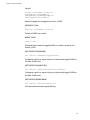
This command creates a port-based or tagged VLAN.
As shown at the start of this section, this command features two
syntaxes. You can use either syntax when creating a port-based or
tagged VLAN. The difference between the two is how you go about
specifying which ports will be members of the VLAN and whether the
114