1
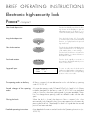
Basic functions
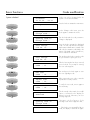
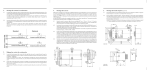
System unlocked
Code modification
Unlocked
03.01.98
14:33
Change code ?
Opening code a1
Change code ?
Opening code b1
Change code ?
OCb1 change
Old cd: 75......
OCb1 change
Old cd: 38......
New OCb1
Code : 13......
New OCb1
Code : 74......
Repeat OCb1
Code : 18......
Repeat OCb1
Code : 74......
Change OCb1
executed
Opening code a1
Change code ?
Codes can only be changed when the
system is in the unlocked state.
Press the knob to activate the main menu.
At the ‘Change code’ menu, press the
knob again to activate this menu.
Turn the knob until the code you want to
change is displayed.
Press the knob to activate the displayed
code. The old code must be entered as
authorisation identification. Instead of the
old code, the mutation code (MU) or the
master code (MA) can be entered here,
if these have been activated.
Turn and press the knob to enter the code
as you would for opening the lock.
After the last number has been entered,
press the knob. The prompt for entering
the new code appears.
Turn and press the knob again to enter
the new eight-digit code.
After entering the new code, it must be
repeated for security reasons.
To verify the new code, enter it again in
the usual way.
If both entered codes match, the modification is confirmed on the display for
about 2 seconds. Otherwise, an error
message appears.
Thereupon, the first function of the
‘Change code’ menu reappears and ...
... if the knob is not operated for 16 seconds, the display is switched off again.